
resume-markdown-mcp
Write your resume in Markdown and export to PDF with AI assistance, using a built-in stylesheet and tools for conversion.
README
resume-markdown-mcp
Write your resume in Markdown, export to PDF — powered by AI via MCP.
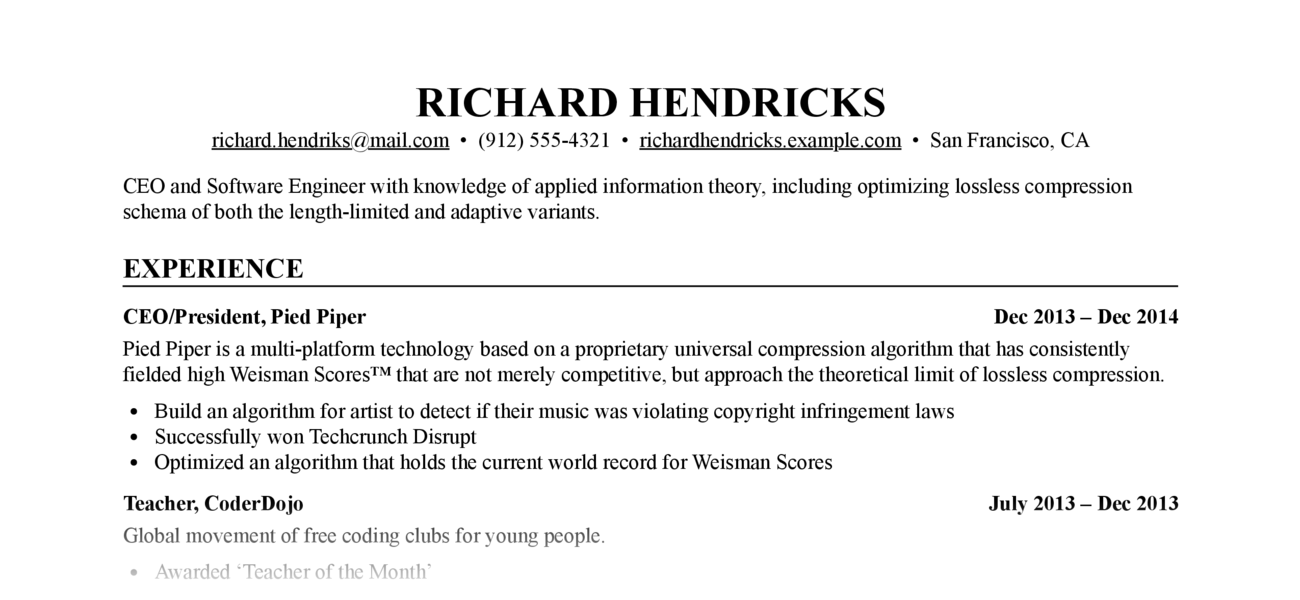
Let Claude write, edit, and format your resume. The MCP server handles Markdown-to-PDF conversion with a built-in stylesheet — no CSS knowledge required.
Requirements: Python ≥ 3.12, Google Chrome or Chromium (for PDF export)
Installation
As an MCP server (recommended)
Add to Claude Code with one command:
claude mcp add resume-markdown -- uvx resume-markdown-mcp@latest
For Claude Desktop, add to claude_desktop_config.json:
{
  "mcpServers": {
    "resume-markdown": {
      "command": "uvx",
      "args": ["resume-markdown-mcp@latest"]
    }
  }
}
As a CLI tool
# Install globally with uv
uv tool install resume-markdown-mcp

# Or with pip
pip install resume-markdown-mcp
MCP Tools & Resources
| Type | Name | Description |
|---|---|---|
| Tool | export_resume_pdf |
Convert a Markdown resume to PDF. Accepts a file path or raw Markdown text. CSS is applied automatically. |
| Resource | resume://template |
The built-in Markdown resume template. AI reads this to understand the required format. |
| Resource | resume://style |
The built-in CSS stylesheet. AI reads this when you want to customise the appearance. |
Example Prompts
- "Help me write a resume for a software engineer role and export it as a PDF to my Desktop"
- "Here's my resume at ~/resume.md — export it to PDF"
- "My resume.md doesn't follow the right format, fix it and export to /tmp/resume.pdf"
- "Make the font size smaller, save the custom CSS to ~/resume.css, and re-export"
Resume Markdown Format
The PDF renderer depends on these Markdown conventions:
# Full Name

- email@example.com
- Phone number
- City, Country

One-line summary (optional)

## Experience

### <span>Job Title, Company</span> <span>2022 – 2025</span>

- Achievement one
- Achievement two

## Education

### <span>Degree, University</span> <span>2018 – 2022</span>

## Skills

- Skill category: item, item, item
The <span> tags inside ### headings are required — they enable the left/right flexbox layout for title and date. AI handles this automatically when writing from scratch; if your existing file lacks them, ask Claude to reformat it before exporting.
CLI Usage
# Create template files (resume.md + resume.css) in the current directory
resume-markdown-mcp init

# Build HTML and PDF from resume.md
resume-markdown-mcp build

# Options
resume-markdown-mcp build --no-pdf          # HTML only
resume-markdown-mcp build --no-html         # PDF only
resume-markdown-mcp build myresume.md       # Custom input file
resume-markdown-mcp build --chrome-path=... # Specify Chrome path
If a resume.css file exists alongside the input file, it is used automatically; otherwise the built-in stylesheet is applied.
You can also run without installing via uvx:
uvx resume-markdown-mcp@latest init
uvx resume-markdown-mcp@latest build resume.md
Customising the Style
For iterative CSS editing, ask Claude to save the stylesheet to a local file:
"Increase the font size and save the custom CSS to ~/resume.css, then export"
Future exports can reference the same file without re-sending the CSS:
"Re-export my resume using ~/resume.css"
You can also edit ~/resume.css directly in any text editor between exports.
How It Works
- AI calls
export_resume_pdfwith Markdown content or a file path - The server converts Markdown to HTML using python-markdown, with the built-in CSS inlined
- Headless Chrome renders the HTML and prints it to PDF
- Chrome exits as soon as the PDF is written; the tool returns the output path
License
MIT
推荐服务器

Baidu Map
百度地图核心API现已全面兼容MCP协议,是国内首家兼容MCP协议的地图服务商。

Playwright MCP Server
一个模型上下文协议服务器,它使大型语言模型能够通过结构化的可访问性快照与网页进行交互,而无需视觉模型或屏幕截图。

Audiense Insights MCP Server
通过模型上下文协议启用与 Audiense Insights 账户的交互,从而促进营销洞察和受众数据的提取和分析,包括人口统计信息、行为和影响者互动。

Magic Component Platform (MCP)
一个由人工智能驱动的工具,可以从自然语言描述生成现代化的用户界面组件,并与流行的集成开发环境(IDE)集成,从而简化用户界面开发流程。

VeyraX
一个单一的 MCP 工具,连接你所有喜爱的工具:Gmail、日历以及其他 40 多个工具。

Kagi MCP Server
一个 MCP 服务器,集成了 Kagi 搜索功能和 Claude AI,使 Claude 能够在回答需要最新信息的问题时执行实时网络搜索。

graphlit-mcp-server
模型上下文协议 (MCP) 服务器实现了 MCP 客户端与 Graphlit 服务之间的集成。 除了网络爬取之外,还可以将任何内容(从 Slack 到 Gmail 再到播客订阅源)导入到 Graphlit 项目中,然后从 MCP 客户端检索相关内容。

Exa MCP Server
模型上下文协议(MCP)服务器允许像 Claude 这样的 AI 助手使用 Exa AI 搜索 API 进行网络搜索。这种设置允许 AI 模型以安全和受控的方式获取实时的网络信息。

mcp-server-qdrant
这个仓库展示了如何为向量搜索引擎 Qdrant 创建一个 MCP (Managed Control Plane) 服务器的示例。

e2b-mcp-server
使用 MCP 通过 e2b 运行代码。