
Smart MCP Proxy
Federating gateway for AI agents to discover and call tools from multiple MCP servers with intelligent search and dynamic tool registration.
README
Smart MCP Proxy



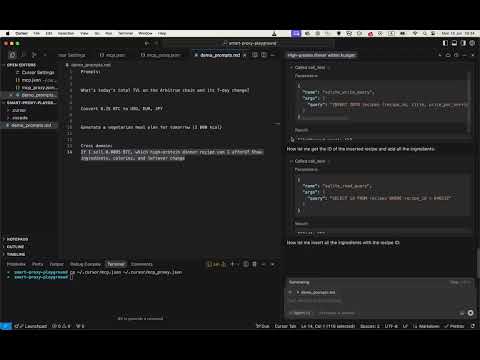
Quick Start
install with pip:
pip install smart-mcp-proxy
Cursor IDE Integration
To use mcpproxy in Cursor IDE, add this configuration to your ~/.cursor/mcp.json:
{
  "mcpServers": {
    "mcp-proxy": {
      "command": "mcpproxy",
      "env": {
        "MCPPROXY_CONFIG_PATH": "/Users/user/.cursor/mcp_proxy.json"
      }
    }
  }
}
Then create a separate ~/.cursor/mcp_proxy.json with your actual(!) MCP servers:
(just an example of configuration, you can use any MCP servers you want)
{
  "mcpServers": {
    "company-mcp": {
      "command": "uvx",
      "args": ["--from", "mcp-company-python@git+https://github.com/company/mcp-company.git", "company-mcp-server"],
      "env": {
        "COMPANY_TOKEN": "${COMPANY_TOKEN}",
        "PORT": "9090"
      }
    },
    "company-docs": {
      "url": "http://localhost:8000/mcp/"
    }
  }
}
Important: The mcp_proxy.json must be a different file than mcp.json to avoid circular proxy connections. The proxy configuration file has the same format as Cursor's MCP configuration but contains the actual MCP servers you want to federate.
Google ADK Integration
To use mcpproxy with Google ADK, you can integrate it using the MCPToolset:
from google.adk.tools.mcp_tool.mcp_toolset import MCPToolset, StdioServerParameters

proxy_tool = MCPToolset(
    connection_params=StdioServerParameters(
        command="mcpproxy",
        args=[],
        env={"MCPPROXY_CONFIG_PATH": "/Users/user/.cursor/mcp_proxy.json"}
    )
)
Tip for better LLM results (copy-paste into your system/dev prompt):
When you see a tool named `retrieval_tools` in the MCP tool list, call it first.
It returns the most relevant tools for the user’s request, helping you answer more accurately and concisely.
A federating gateway that sits between AI agents and multiple Model Context Protocol (MCP) servers, providing intelligent tool discovery and dynamic registration.
🌐 Website: mcpproxy.app 📦 PyPI: pypi.org/project/smart-mcp-proxy 🔗 GitHub: github.com/Dumbris/mcpproxy
Features
- Flexible Routing Strategies: Two modes -
DYNAMIC(tools registered on-demand) orCALL_TOOL(proxy-only execution) - Dynamic Tool Discovery: Automatically discovers tools from multiple MCP servers
- Intelligent Search: Uses configurable embedding backends (BM25, HuggingFace, OpenAI) to find relevant tools
- One-Click Tool Access: Single
retrieve_toolsfunction that searches, registers, and exposes the top 5 most relevant tools - FastMCP Integration: Built on FastMCP v2 for robust server runtime and client capabilities
- Persistent Indexing: SQLite + Faiss storage for fast tool lookup and change detection
- MCP Spec Compliant: Emits proper
notifications/tools/list_changedevents - Flexible Dependencies: Optional dependencies for different backends to minimize install size
Architecture
┌─────────────────┐    ┌─────────────────────────────────┐    ┌─────────────────┐
│   AI Agent      │───▶│     Smart MCP Proxy             │───▶│  MCP Servers    │
│                 │    │                                 │    │                 │
│ retrieve_tools()│    │ ┌─────────────┐ ┌─────────────┐ │    │ • company-prod  │
│                 │    │ │   Indexer   │ │ Persistence │ │    │ • company-docs  │
│ tool_1()        │◀───│ │   (BM25/    │ │  (SQLite +  │ │    │ • oauth-server  │
│ tool_2()        │    │ │ HF/OpenAI)  │ │   Faiss)    │ │    │ • ...           │
│ ...             │    │ └─────────────┘ └─────────────┘ │    │                 │
└─────────────────┘    └─────────────────────────────────┘    └─────────────────┘
Quick Start
1. Installation
Choose your installation based on the embedding backend you want to use:
# Basic installation with BM25 (lexical search, no ML dependencies)
pip install smart-mcp-proxy

# Or with specific backends:
pip install smart-mcp-proxy[bm25]         # Explicit BM25 (same as basic)
pip install smart-mcp-proxy[huggingface]  # HuggingFace + vector search
pip install smart-mcp-proxy[openai]       # OpenAI embeddings + vector search
pip install smart-mcp-proxy[all]          # All backends available

# Development install
git clone https://github.com/Dumbris/mcpproxy.git
cd mcpproxy
pip install -e .[all]
The proxy will automatically check for required dependencies and provide helpful error messages if you try to use a backend without the required packages installed.
2. Start the Proxy
# Using the installed script
MCPPROXY_CONFIG_PATH=mcp_config.json mcpproxy
The proxy will:
- Discover tools from all configured MCP servers
- Index them using the chosen embedding backend
- Start MCP server, by default transport is stdio, you can use MCPPROXY_TRANSPORT to change it to streamable-http or sse
Routing Strategies
Smart MCP Proxy supports two routing strategies:
DYNAMIC Mode
- Behavior: AI agent calls
retrieve_tools, which searches and dynamically registers the most relevant tools as MCP tools - Tool Registration: Tools become available in the MCP protocol after
retrieve_toolscall - Client View: Sees both
retrieve_toolsand the registered tools (e.g.,company_create_user,storage_upload_file) - Use Case: Best for clients that can handle dynamic tool registration and notifications
CALL_TOOL Mode (Default)
- Behavior: AI agent calls
retrieve_toolsto discover tools, then usescall_toolto execute them - Tool Registration: No dynamic registration - tools are executed through the proxy
- Client View: Only sees
retrieve_toolsandcall_tooltools - Use Case: Better for clients with tool registration limits or simpler tool management
# Set routing strategy
export MCPPROXY_ROUTING_TYPE=DYNAMIC    # or CALL_TOOL (default)
Output Truncation
To prevent context bloating from large tool outputs, you can configure output truncation:
# Truncate tool outputs to 2000 characters (disabled by default)
export MCPPROXY_TRUNCATE_OUTPUT_LEN=2000
When enabled, outputs exceeding the limit are truncated showing:
- First portion of the output
<truncated by smart mcp proxy>marker- Last 50 characters of the output
This helps manage token usage while preserving both the beginning and end of outputs.
Usage
Cursor IDE
See example on the top of the README.md file.
For AI Agents
DYNAMIC Mode Usage:
- Call
retrieve_tools("user management") - Use the returned tools directly (e.g.,
company_create_user)
CALL_TOOL Mode Usage:
- Call
retrieve_tools("user management") - Call
call_tool("company_create_user", {"name": "john", "email": "john@example.com"})
Programmatic Usage
from mcpproxy import SmartMCPProxyServer

proxy = SmartMCPProxyServer("config.json")
await proxy.start()

# Use the indexer directly
results = await proxy.indexer.search_tools("delete volume", k=3)
for result in results:
    print(f"{result.tool.name}: {result.score}")
Project Structure
mcpproxy/
├── models/
│   └── schemas.py           # Pydantic models and schemas
├── persistence/
│   ├── db.py               # SQLite operations
│   ├── faiss_store.py      # Faiss vector storage
│   └── facade.py           # Unified persistence interface
├── indexer/
│   ├── base.py             # Base embedder interface
│   ├── bm25.py             # BM25 implementation
│   ├── huggingface.py      # HuggingFace embeddings
│   ├── openai.py           # OpenAI embeddings
│   └── facade.py           # Search and indexing interface
├── server/
│   ├── config.py           # Configuration management
│   └── mcp_server.py       # FastMCP server implementation
└── utils/
    └── hashing.py          # SHA-256 utilities for change detection
Environment Variables
| Variable | Values | Default | Description |
|---|---|---|---|
MCPPROXY_ROUTING_TYPE |
DYNAMIC, CALL_TOOL |
CALL_TOOL |
Tool routing strategy |
MCPPROXY_EMBEDDER |
BM25, HF, OPENAI |
BM25 |
Embedding backend |
MCPPROXY_HF_MODEL |
HuggingFace model name | sentence-transformers/all-MiniLM-L6-v2 |
HF model |
MCPPROXY_TOP_K |
Integer | 5 |
Number of tools to register |
MCPPROXY_TOOLS_LIMIT |
Integer | 15 |
Maximum number of tools in active pool |
MCPPROXY_TOOL_NAME_LIMIT |
Integer | 60 |
Maximum tool name length |
MCPPROXY_TRUNCATE_OUTPUT_LEN |
Integer | - | Truncate tool output to prevent context bloating (disabled by default) |
MCPPROXY_LIST_CHANGED_EXEC |
Shell command | - | External command to execute after tool changes (see Client Compatibility) |
MCPPROXY_DATA_DIR |
Directory path | ~/.mcpproxy |
Directory for database and index files |
MCPPROXY_CONFIG_PATH |
Path to config file | mcp_config.json |
Config file location |
MCPPROXY_HOST |
Host to bind | 127.0.0.1 |
Server host |
MCPPROXY_PORT |
Port to bind | 8000 |
Server port |
MCPPROXY_TRANSPORT |
Transport to use | stdio |
Transport to use |
MCPPROXY_LOG_LEVEL |
Log level | INFO |
Logging level (DEBUG, INFO, WARNING, ERROR) |
MCPPROXY_LOG_FILE |
File path | - | Optional log file path |
MCPPROXY_RESET_DATA |
Boolean | false |
Reset all data (useful when dimensions change) |
Client Compatibility
MCP Tool List Refresh Workaround
This is only needed for DYNAMIC routing mode. The default CALL_TOOL routing mode doesn't require MCPPROXY_LIST_CHANGED_EXEC since tools are not dynamically registered.
Some MCP clients (like Cursor IDE) don't properly handle the standard tools/list_changed notification when new tools are registered in DYNAMIC mode. As a temporary workaround, you can configure the proxy to execute an external command after tool changes to trigger client refresh.
For Cursor IDE
Set the MCPPROXY_LIST_CHANGED_EXEC environment variable to touch the MCP configuration file:
# For macOS/Linux
export MCPPROXY_LIST_CHANGED_EXEC="touch $HOME/.cursor/mcp.json"

# For Windows (PowerShell)
$env:MCPPROXY_LIST_CHANGED_EXEC = "cmd /c copy `"$HOME\.cursor\mcp.json`" +,,"
This causes Cursor to detect the config file change and refresh its tool list.
How it Works
- When you call
retrieve_tools, the proxy registers new tools - Standard
tools/list_changednotification is sent (proper MCP way) - If
MCPPROXY_LIST_CHANGED_EXECis set, the command is executed asynchronously - The command triggers the MCP client to refresh its tool list
Security Note
⚠️ Important: The command in MCPPROXY_LIST_CHANGED_EXEC is executed with shell privileges. Only use trusted commands and never set this variable to user-provided input.
When Not to Use
- Your MCP client properly handles
tools/list_changednotifications - You're using the proxy programmatically (not through an MCP client)
- Security policies prohibit executing external commands
This feature is disabled by default and only executes when explicitly configured.
Contributing
We welcome contributions! Please see our GitHub repository for:
- 🐛 Bug Reports: Submit an issue
- 💡 Feature Requests: Start a discussion
- 🔧 Pull Requests: Fork the repo and submit a PR
Development Setup
git clone https://github.com/Dumbris/mcpproxy.git
cd mcpproxy
pip install -e .[dev,all]
pytest tests/
License
This project is licensed under the MIT License - see the LICENSE file for details.
推荐服务器

Baidu Map
百度地图核心API现已全面兼容MCP协议,是国内首家兼容MCP协议的地图服务商。

Playwright MCP Server
一个模型上下文协议服务器,它使大型语言模型能够通过结构化的可访问性快照与网页进行交互,而无需视觉模型或屏幕截图。

Magic Component Platform (MCP)
一个由人工智能驱动的工具,可以从自然语言描述生成现代化的用户界面组件,并与流行的集成开发环境(IDE)集成,从而简化用户界面开发流程。

Audiense Insights MCP Server
通过模型上下文协议启用与 Audiense Insights 账户的交互,从而促进营销洞察和受众数据的提取和分析,包括人口统计信息、行为和影响者互动。

VeyraX
一个单一的 MCP 工具,连接你所有喜爱的工具:Gmail、日历以及其他 40 多个工具。

graphlit-mcp-server
模型上下文协议 (MCP) 服务器实现了 MCP 客户端与 Graphlit 服务之间的集成。 除了网络爬取之外,还可以将任何内容(从 Slack 到 Gmail 再到播客订阅源)导入到 Graphlit 项目中,然后从 MCP 客户端检索相关内容。

Kagi MCP Server
一个 MCP 服务器,集成了 Kagi 搜索功能和 Claude AI,使 Claude 能够在回答需要最新信息的问题时执行实时网络搜索。

e2b-mcp-server
使用 MCP 通过 e2b 运行代码。

Neon MCP Server
用于与 Neon 管理 API 和数据库交互的 MCP 服务器

Exa MCP Server
模型上下文协议(MCP)服务器允许像 Claude 这样的 AI 助手使用 Exa AI 搜索 API 进行网络搜索。这种设置允许 AI 模型以安全和受控的方式获取实时的网络信息。