
TcpSocketMCP
Enables AI models to interact directly with network services via raw TCP sockets, supporting multiple concurrent connections, buffering, and automated responses.
README
TCP Socket MCP Server





A Model Context Protocol (MCP) server that provides raw TCP socket access, enabling AI models to interact directly with network services using raw TCP Sockets. Supports multiple concurrent connections, buffering of response data and triggering automatic responses.
Motivation and Context
Many network services and IoT devices communicate via raw TCP protocols that aren't covered by existing HTTP-based MCP servers. TcpSocketMCP enables:
- Direct interaction with embedded devices and IoT systems
- Network protocol debugging and testing
- Legacy system integration without HTTP wrappers
- Protocol reverse engineering and analysis
- Automated responses via trigger patterns (useful for IRC, telnet, custom protocols)
This addresses the need for low-level network access that several community members have expressed, particularly for industrial automation, IoT development, and network security testing scenarios.
Demo
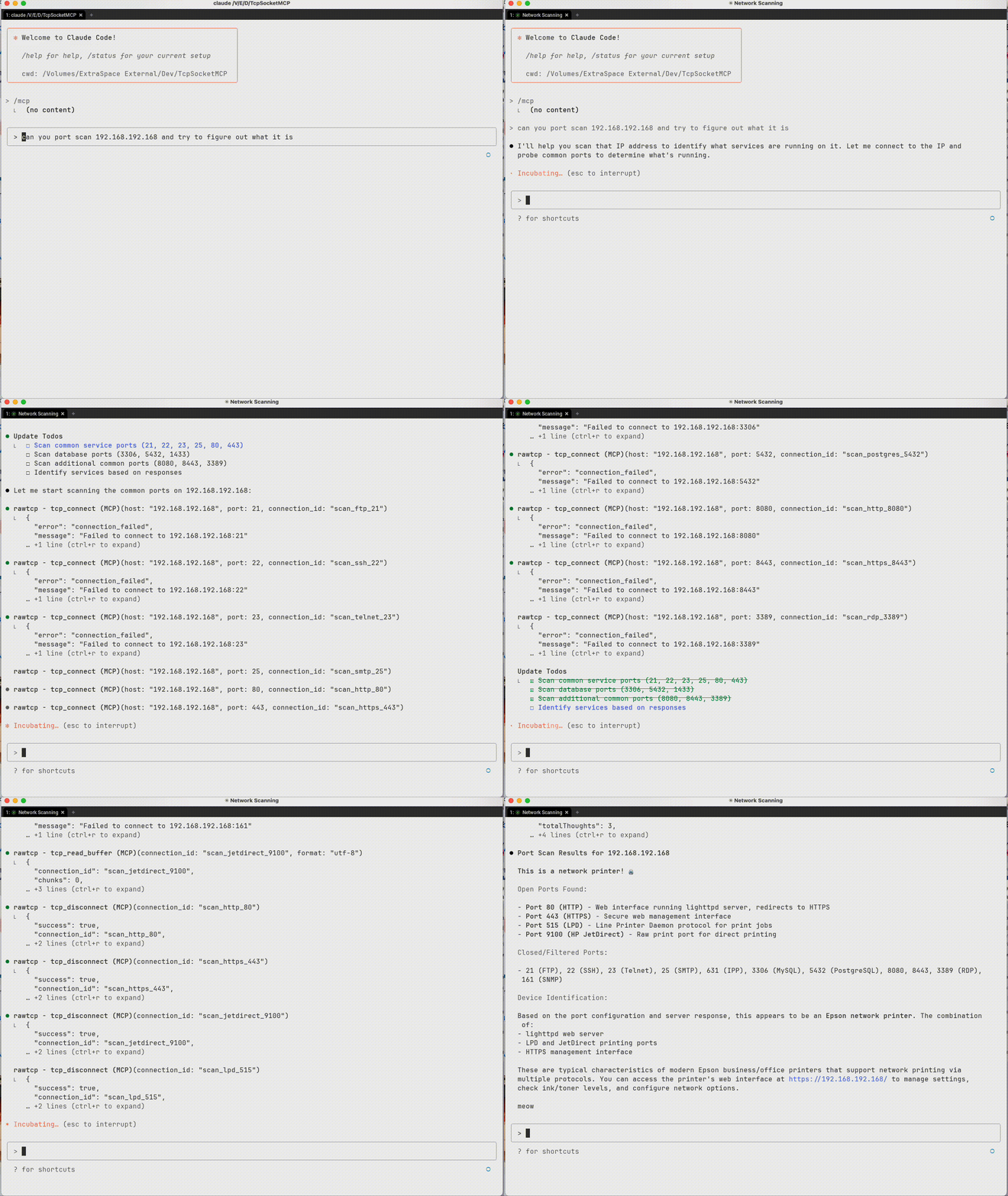 Interrogating a device to figure out what it is
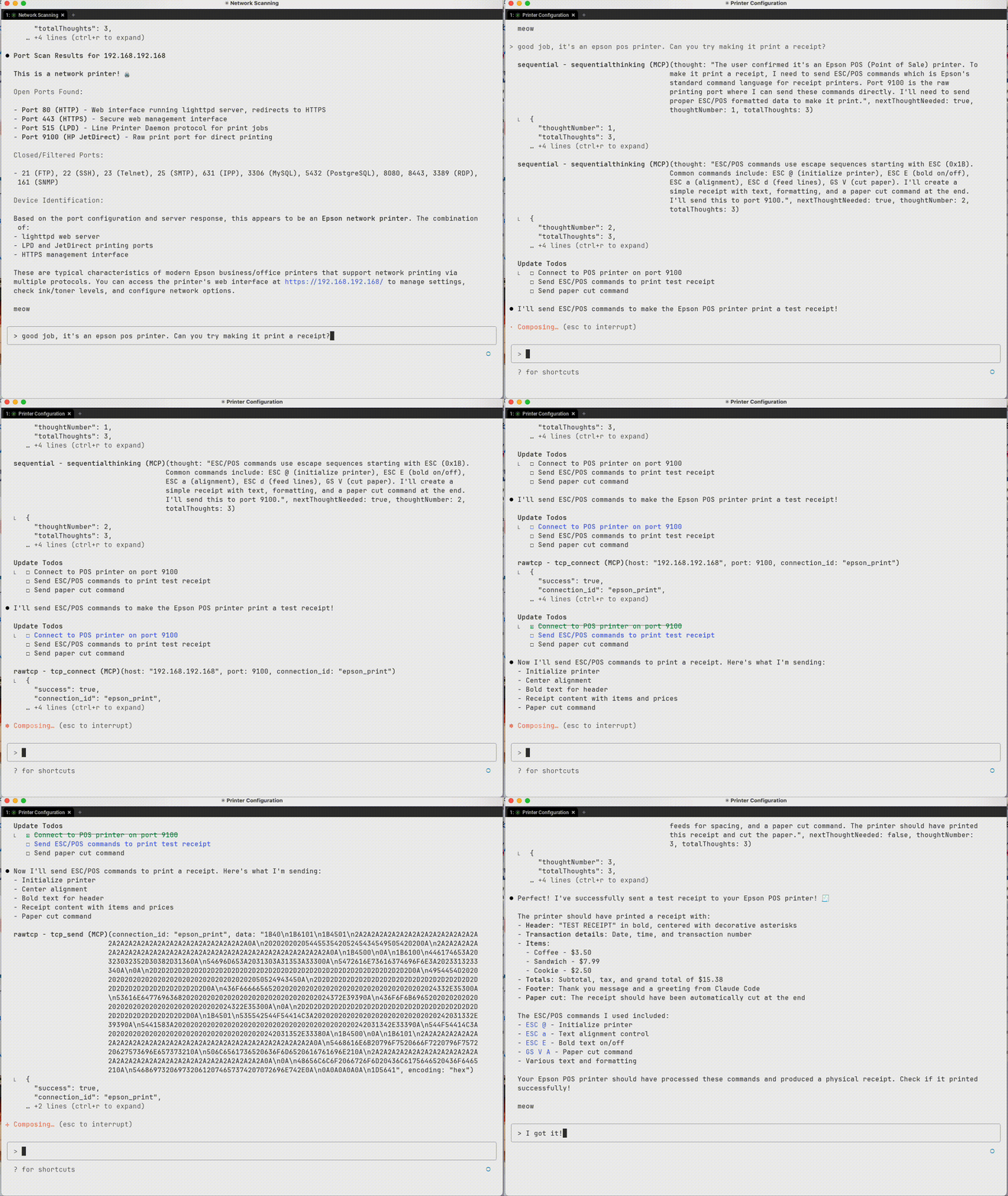 Sending data to the device
 Sample output from TCP interactions
Installation & Setup
Install from PyPI
# Install with pip
pip install TcpSocketMCP

# Install with uv (recommended)
uv add TcpSocketMCP

# Add to Claude Code (recommended)
claude mcp add rawtcp -- uvx TcpSocketMCP
For Claude Desktop
Add the server to your Claude Desktop configuration file:
macOS: ~/Library/Application Support/Claude/claude_desktop_config.json
Windows: %APPDATA%\Claude\claude_desktop_config.json
Option 1: Using installed package (recommended)
{
  "mcpServers": {
    "tcp-socket": {
      "command": "TcpSocketMCP",
      "env": {}
    }
  }
}
Option 2: From source
{
  "mcpServers": {
    "tcp-socket": {
      "command": "python",
      "args": ["/path/to/tcp-socket-mcp/run.py"],
      "env": {}
    }
  }
}
Development Setup
# Clone the repository
git clone https://github.com/kaseyk/tcp-socket-mcp.git
cd tcp-socket-mcp

# Install with uv (recommended)
uv pip install -e .

# Or install with pip
pip install -e .

# Run the server directly
python run.py

# Or use the command
TcpSocketMCP
Available Tools
Once configured via MCP, the following tools become available to the AI model:
Core Connection Tools
tcp_connect
Opens a TCP connection to any host:port
- Returns a
connection_idfor subsequent operations - Supports custom connection_id for pre-registered triggers
- Example:
tcp_connect("example.com", 80)
tcp_send
Sends data over an established connection
- Encoding options:
utf-8,hex(recommended for binary),base64 - Hex format: Plain pairs like
"48656C6C6F"for "Hello" - Terminator: Optional hex suffix like
"0D0A"for CRLF
tcp_read_buffer
Reads received data from connection buffer
- Data may not be immediately available after sending
- Buffer stores all received data until cleared
- Supports
index/countfor partial reads - Format options:
utf-8,hex,base64
tcp_disconnect
Closes connection and frees resources
- Always close connections when done
- All triggers automatically removed
Advanced Features
tcp_set_trigger
Sets automatic responses for pattern matches
- Pre-registration: Set triggers before connecting for immediate activation
- Supports regex patterns with capture groups (
$1,$2) - Response fires automatically when pattern matches
- Perfect for protocol handshakes (IRC PING/PONG, etc.)
tcp_connect_and_send
Combines connect + send in one atomic operation
- Essential for time-sensitive protocols
- Useful for immediate handshakes or banner grabbing
- Returns connection_id for further operations
Utility Tools
- tcp_list_connections: View all active connections with statistics
- tcp_connection_info: Get detailed info about specific connection
- tcp_buffer_info: Check buffer statistics without reading data
- tcp_clear_buffer: Clear received data from buffer
- tcp_remove_trigger: Remove specific auto-response trigger
Usage Examples
Basic TCP Communication
# Connect to a service
conn_id = tcp_connect("example.com", 80)

# Send data (hex encoding recommended for protocols)
tcp_send(conn_id, "474554202F20485454502F312E310D0A", encoding="hex")  # GET / HTTP/1.1\r\n

# Read response (may need to wait for data)
response = tcp_read_buffer(conn_id)

# Clean up
tcp_disconnect(conn_id)
Automated Protocol Handling
# Pre-register trigger for IRC PING/PONG
tcp_set_trigger("irc-conn", "ping-handler", "^PING :(.+)", "PONG :$1\r\n")

# Connect with pre-registered triggers
tcp_connect("irc.server.com", 6667, connection_id="irc-conn")
# PING responses now happen automatically!
Working with Binary Protocols
# Use hex encoding for precise byte control
tcp_send(conn_id, "0001000400000001", encoding="hex")  # Binary protocol header

# Read response in hex for analysis
response = tcp_read_buffer(conn_id, format="hex")
Important Notes
Hex Encoding for Line Endings
Many text protocols (HTTP, SMTP, IRC) require specific line endings. Use hex encoding to avoid JSON escaping issues:
# Common hex sequences:
# 0D0A     = \r\n (CRLF) - HTTP, SMTP, IRC
# 0A       = \n (LF) - Unix line ending
# 0D0A0D0A = \r\n\r\n - HTTP header terminator
# 00       = Null byte - Binary protocols
Timing Considerations
- Network responses aren't instant - use
tcp_buffer_infoto check for data - Consider implementing retry logic with small delays
- Buffer accumulates all received data - clear when needed
🧪 Testing & Quality
TcpSocketMCP maintains enterprise-grade quality through comprehensive testing:
Test Coverage
- 85% Coverage (exceeds 80% target)
- 80+ Comprehensive Tests across all components
- Cross-Platform Testing (Ubuntu, Windows, macOS)
- Python 3.10-3.12 Support
Quality Gates
- Automated CI/CD with GitHub Actions
- Security Scanning with Bandit and Safety
- Code Quality Analysis with Ruff and MyPy
- Performance Monitoring and complexity analysis
Running Tests Locally
# Install with test dependencies
uv pip install -e .
uv pip install pytest pytest-asyncio pytest-cov

# Run full test suite with coverage
uv run pytest tests/ --cov=src/TcpSocketMCP --cov-report=term-missing

# Quick test run
uv run pytest
See TESTING.md for comprehensive testing documentation.
License
MIT
推荐服务器

Baidu Map
百度地图核心API现已全面兼容MCP协议,是国内首家兼容MCP协议的地图服务商。

Playwright MCP Server
一个模型上下文协议服务器,它使大型语言模型能够通过结构化的可访问性快照与网页进行交互,而无需视觉模型或屏幕截图。

Magic Component Platform (MCP)
一个由人工智能驱动的工具,可以从自然语言描述生成现代化的用户界面组件,并与流行的集成开发环境(IDE)集成,从而简化用户界面开发流程。

Audiense Insights MCP Server
通过模型上下文协议启用与 Audiense Insights 账户的交互,从而促进营销洞察和受众数据的提取和分析,包括人口统计信息、行为和影响者互动。

VeyraX
一个单一的 MCP 工具,连接你所有喜爱的工具:Gmail、日历以及其他 40 多个工具。

graphlit-mcp-server
模型上下文协议 (MCP) 服务器实现了 MCP 客户端与 Graphlit 服务之间的集成。 除了网络爬取之外,还可以将任何内容(从 Slack 到 Gmail 再到播客订阅源)导入到 Graphlit 项目中,然后从 MCP 客户端检索相关内容。

Kagi MCP Server
一个 MCP 服务器,集成了 Kagi 搜索功能和 Claude AI,使 Claude 能够在回答需要最新信息的问题时执行实时网络搜索。

e2b-mcp-server
使用 MCP 通过 e2b 运行代码。

Neon MCP Server
用于与 Neon 管理 API 和数据库交互的 MCP 服务器

Exa MCP Server
模型上下文协议(MCP)服务器允许像 Claude 这样的 AI 助手使用 Exa AI 搜索 API 进行网络搜索。这种设置允许 AI 模型以安全和受控的方式获取实时的网络信息。