
TechStart CRM MCP Server
Enables natural language queries, CRUD operations, and analytics on a PostgreSQL database (Neon) via Claude, supporting customers, tickets, products, and analytics.
README
TechStart CRM — MCP Server
Connect your business database to Claude using the Model Context Protocol. Natural language queries, CRUD operations, and analytics — all through conversation.
Architecture
graph LR
    A["Claude Desktop / Code"] -- "stdio" --> B["MCP Server<br/>(Node.js + TypeScript)"]
    B -- "Neon Serverless Driver" --> C["PostgreSQL<br/>(Neon)"]
    C -- "query results" --> B
    B -- "tool responses" --> A

    style A fill:#6366f1,stroke:#4338ca,color:#fff
    style B fill:#0ea5e9,stroke:#0284c7,color:#fff
    style C fill:#22c55e,stroke:#16a34a,color:#fff
Claude communicates with the MCP server over stdio. The server translates natural language tool calls into parameterized SQL queries via the Neon serverless driver and returns structured results that Claude interprets for the user.
Demo
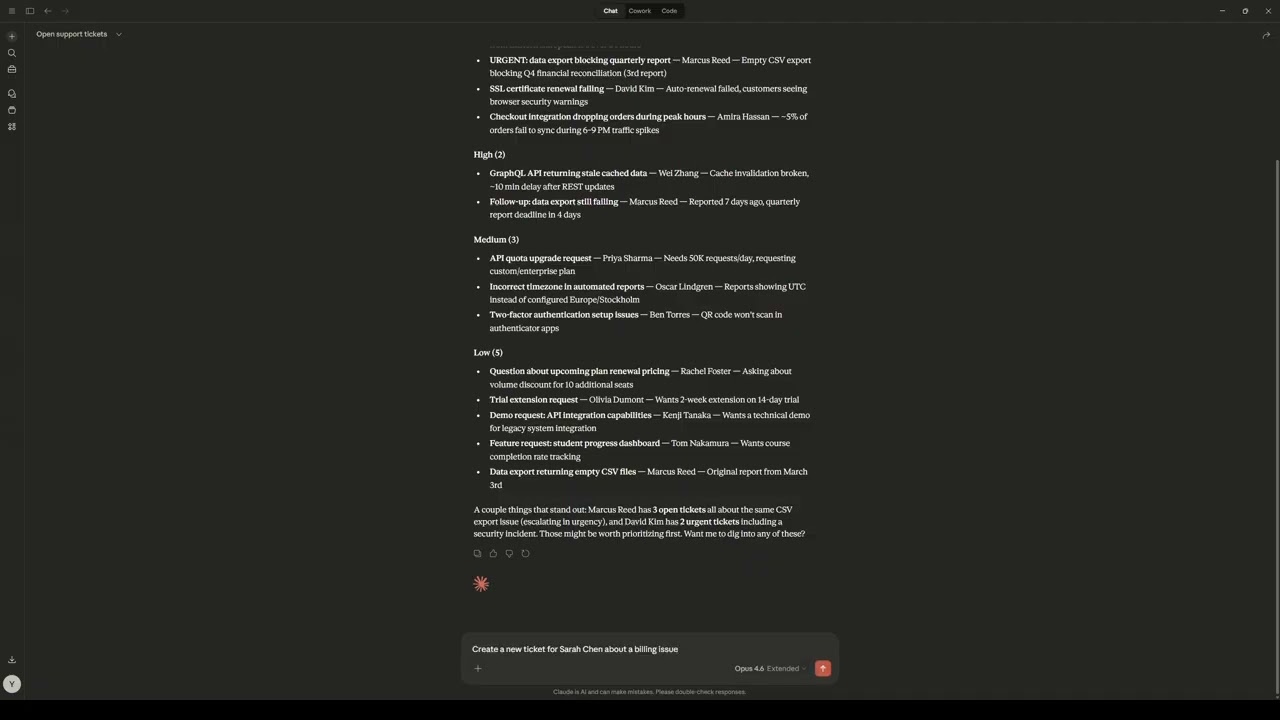
Querying open tickets

Creating a ticket through conversation

Business summary dashboard

Features
Customers
| Tool | Description |
|---|---|
list_customers |
List all customers, optionally filter by status or company name |
get_customer |
Get a single customer by ID, including open/total ticket counts and recent tickets |
create_customer |
Add a new customer with name, email, optional company and status |
update_customer |
Update any combination of customer fields by ID |
Tickets
| Tool | Description |
|---|---|
list_tickets |
List tickets with filters by status, priority, customer ID, or customer name |
get_ticket |
Get full ticket details including linked customer information |
create_ticket |
Create a support ticket linked by customer ID or customer name lookup |
close_ticket |
Mark a ticket as resolved with an optional resolution note |
Products
| Tool | Description |
|---|---|
list_products |
List all products with formatted pricing |
search_products |
Search products by name, category, or description |
Analytics
| Tool | Description |
|---|---|
get_summary |
Dashboard stats: customer counts by status, ticket breakdown by priority, product catalog value by category, recent activity |
Schema Introspection
| Resource | URI | Description |
|---|---|---|
| Database schema | schema://tables |
Full schema for all tables including columns, types, constraints, and relationships |
Tech Stack
- Runtime: Node.js + TypeScript
- MCP SDK: @modelcontextprotocol/sdk
- Database: Neon Postgres (@neondatabase/serverless)
- Validation: Zod
- Linter/Formatter: Biome
- Transport: stdio
Setup
1. Clone and install
git clone https://github.com/voyagi/upwork-mcp-server.git
cd upwork-mcp-server
npm install
2. Create a Neon database
Go to neon.tech and create a new project. Copy the connection string from the Connection Details panel.
3. Configure environment
cp .env.example .env
Fill in your Neon connection string:
DATABASE_URL— your Neon Postgres connection string (e.g.,postgresql://user:pass@ep-xxx.region.aws.neon.tech/neondb?sslmode=require)
4. Create tables and seed data
npm run build
node seed/run-seed.mjs
This creates the tables and populates the database with 22 customers, 12 products, and 32 support tickets.
5. Run
npm start
The server starts listening on stdio. To verify it works, connect it to Claude Desktop (see below).
Claude Desktop Integration
Add the following to your Claude Desktop config file:
- macOS:
~/Library/Application Support/Claude/claude_desktop_config.json - Windows:
%APPDATA%\Claude\claude_desktop_config.json
{
  "mcpServers": {
    "techstart-crm": {
      "command": "node",
      "args": ["/absolute/path/to/upwork-mcp-server/dist/index.js"],
      "env": {
        "DATABASE_URL": "postgresql://user:pass@ep-xxx.region.aws.neon.tech/neondb?sslmode=require"
      }
    }
  }
}
Replace /absolute/path/to/upwork-mcp-server with the actual path where you cloned the repository, and fill in your Neon connection string.
Demo Conversation
Once connected, try a conversation like this:
User: What data do you have access to?
Claude: [Reads schema://tables] I have access to a CRM database with three tables: customers (name, email, company, status), tickets (subject, priority, status, linked to customers), and products (name, category, pricing). I can query, create, and update records across all of them.
User: How are things looking today?
Claude: [Calls get_summary] Here is your dashboard overview:
- Customers: 22 total — 15 active, 4 inactive, 3 leads
- Tickets: 32 total — 23 open (4 urgent, 7 high priority), 9 closed
- Products: 12 items across 3 categories, total catalog value of $2,348.00
- This week: 2 new customers signed up, 0 tickets resolved
The 4 urgent tickets should be your first priority.
User: Show me the urgent tickets.
Claude: [Calls list_tickets with status: "open", priority: "urgent"] There are 4 urgent open tickets:
- URGENT: data export blocking quarterly report — Apex Manufacturing (Marcus Reed), created 1 day ago
- SSL certificate renewal failing — Ironclad Security (David Kim), created 2 days ago
- Checkout integration dropping orders during peak hours — Velvet Retail (Amira Hassan), created 2 days ago
- Suspicious login attempts from unknown IPs — Ironclad Security (David Kim), created 1 day ago
The SSL certificate issue is customer-facing — want me to look into any of these?
User: Close the SSL ticket. We renewed the certificate and updated the configuration.
Claude: [Calls close_ticket with resolution: "SSL certificate renewed and server configuration updated. Verified HTTPS connectivity restored."] Done. The SSL certificate ticket for Ironclad Security has been closed with your resolution note. That brings your urgent count down to 3.
User: Before we onboard them — what integration options do we offer?
Claude: [Calls search_products with query: "integration"] We have two integration-related products:
- API Access — $79.00/mo — REST and GraphQL API access, 10K requests/day, webhook integrations
- Custom Integrations — $149.00/mo — Custom API integrations with your existing tools (Salesforce, HubSpot, Jira, etc.)
The API Access add-on covers standard integrations. If they need connections to specific internal systems, the Custom Integrations package includes hands-on setup.
User: We just signed Pinnacle Retail as a new customer. Contact is Dana Park, dana@pinnacleretail.com.
Claude: [Calls create_customer with name: "Dana Park", email: "dana@pinnacleretail.com", company: "Pinnacle Retail"] Created. Dana Park from Pinnacle Retail has been added as an active customer. Would you like to create a welcome ticket or onboarding task for them?
User: What is the updated summary now?
Claude: [Calls get_summary] Updated numbers after your changes:
- Customers: 23 total — 16 active, 4 inactive, 3 leads (up from 22)
- Tickets: 32 total — 22 open (3 urgent, 7 high), 10 closed
- This week: 3 new customers, 1 ticket resolved
One fewer urgent ticket and one more customer compared to a few minutes ago. The 3 remaining urgent tickets are the data export blocking quarterly report (Marcus Reed), checkout integration dropping orders (Amira Hassan), and suspicious login attempts (David Kim).
Database Schema
-- Customers: name, email, company, status (active/inactive/lead)
create table customers (
  id            uuid primary key default gen_random_uuid(),
  name          text not null,
  email         text not null unique,
  company       text,
  status        text not null default 'active'
                check (status in ('active', 'inactive', 'lead')),
  created_at    timestamptz default now()
);

-- Products: catalog with pricing in cents
create table products (
  id            uuid primary key default gen_random_uuid(),
  name          text not null,
  category      text not null,
  price_cents   integer not null,
  description   text,
  created_at    timestamptz default now()
);

-- Tickets: support tickets linked to customers
create table tickets (
  id            uuid primary key default gen_random_uuid(),
  customer_id   uuid references customers(id) on delete cascade,
  subject       text not null,
  description   text,
  status        text not null default 'open'
                check (status in ('open', 'in_progress', 'closed')),
  priority      text not null default 'medium'
                check (priority in ('low', 'medium', 'high', 'urgent')),
  resolution    text,
  created_at    timestamptz default now(),
  closed_at     timestamptz
);
Development
npm run dev      # Run with hot reload (tsx watch)
npm run build    # Compile TypeScript
npm run start    # Run compiled version
npm run check    # Biome lint + format
Testing
npm test            # Run all tests once
npm run test:watch  # Run tests in watch mode during development
The test suite covers:
- Server registration - verifies all 11 tools and the schema resource are registered
- Schema resource - validates the database schema JSON structure and relationships
- Customer tools - CRUD operations, duplicate email handling, empty results
- Ticket tools - creation with customer name resolution, closing, state validation
- Product tools - listing with price formatting, search, empty results
- Analytics - dashboard aggregation with parallel query batching
- Validation - enum schemas with custom error messages
- Response helpers - MCP response formatting utilities
- Formatters - price and product display formatting
All tool tests use InMemoryTransport for full MCP client/server integration testing with a mocked database backend, so no database connection is needed.
E2E Testing
node seed/e2e-test.mjs # 14 tests against live Neon database
Troubleshooting
"Missing required environment variable: DATABASE_URL"
You haven't created the .env file. Copy .env.example to .env and fill in your Neon connection string.
"Failed to connect to database" The server starts but can't reach Neon. Check that:
DATABASE_URLis your full Neon connection string (e.g.,postgresql://user:pass@ep-xxx.region.aws.neon.tech/neondb?sslmode=require)- Your Neon project is active (free-tier projects suspend after inactivity but wake automatically on connection)
"relation customers does not exist" or similar
The database tables haven't been created. Run node seed/run-seed.mjs to create tables and seed demo data.
Server starts but Claude doesn't see the tools
Verify the path in claude_desktop_config.json points to the compiled dist/index.js (not src/index.ts). Run npm run build first if you haven't.
License
MIT
推荐服务器

Baidu Map
百度地图核心API现已全面兼容MCP协议,是国内首家兼容MCP协议的地图服务商。

Playwright MCP Server
一个模型上下文协议服务器,它使大型语言模型能够通过结构化的可访问性快照与网页进行交互,而无需视觉模型或屏幕截图。

Magic Component Platform (MCP)
一个由人工智能驱动的工具,可以从自然语言描述生成现代化的用户界面组件,并与流行的集成开发环境(IDE)集成,从而简化用户界面开发流程。

Audiense Insights MCP Server
通过模型上下文协议启用与 Audiense Insights 账户的交互,从而促进营销洞察和受众数据的提取和分析,包括人口统计信息、行为和影响者互动。

VeyraX
一个单一的 MCP 工具,连接你所有喜爱的工具:Gmail、日历以及其他 40 多个工具。

graphlit-mcp-server
模型上下文协议 (MCP) 服务器实现了 MCP 客户端与 Graphlit 服务之间的集成。 除了网络爬取之外,还可以将任何内容(从 Slack 到 Gmail 再到播客订阅源)导入到 Graphlit 项目中,然后从 MCP 客户端检索相关内容。

Kagi MCP Server
一个 MCP 服务器,集成了 Kagi 搜索功能和 Claude AI,使 Claude 能够在回答需要最新信息的问题时执行实时网络搜索。

e2b-mcp-server
使用 MCP 通过 e2b 运行代码。

Neon MCP Server
用于与 Neon 管理 API 和数据库交互的 MCP 服务器

Exa MCP Server
模型上下文协议(MCP)服务器允许像 Claude 这样的 AI 助手使用 Exa AI 搜索 API 进行网络搜索。这种设置允许 AI 模型以安全和受控的方式获取实时的网络信息。