
timermcp
A millisecond-precision MCP timer server that lets you start, stop, and split timers via natural language, with a live dashboard, personal bests, and race mode.
README
TimerMCP ⏱ — the talking stopwatch for Claude
A millisecond-precision MCP timer server. Say "start the timer" to Claude — the clock starts on the server's monotonic nanosecond clock, a live wall display lights up in your browser, and when you say "stop," Claude announces the official time like a track announcer.
🏁 STOP THE CLOCK! 'ship the landing page' finishes in 4:07.312!
🏆 NEW PERSONAL BEST — 18.455 faster than the old record!
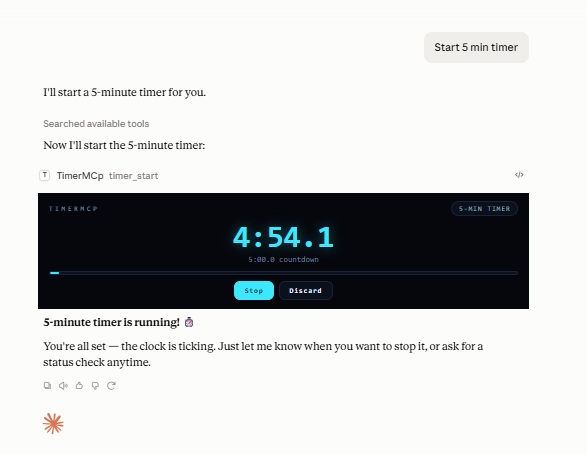
With the free cloud connector (timermcp.com), countdowns render as a live ticking card right in the chat — desktop and mobile:
Why the milliseconds are honest (the latency math)
You say "start" at t₀; the command reaches the server after delay d₁ (typing + model + transport). Server stamps S₁ = t₀ + d₁. You say "stop" at t₁, stamped S₂ = t₁ + d₂.
reported = S₂ − S₁ = (t₁ − t₀) + (d₂ − d₁)
Both timestamps are taken server-side, so the constant part of the pipeline delay cancels. Only the difference between start-side and stop-side latency can leak in — and for symmetric calls that's small. All math runs on process.hrtime.bigint() (monotonic nanoseconds), immune to NTP jumps and DST.
If you believe your pipeline is asymmetric, bias it out: timer_config accepts start_offset_ms / stop_offset_ms, subtracted from every result. raw_elapsed_ms (pure monotonic) is always returned alongside the adjusted elapsed_ms.
Setup
Prerequisite: Node.js ≥ 18 (node --version).
TimerMCP is on npm — no clone or build needed.
Claude Code (one command):
claude mcp add timermcp -- npx -y timermcp
claude mcp list   # should show timermcp ✓ connected
Claude Desktop — edit claude_desktop_config.json:
- macOS:
~/Library/Application Support/Claude/claude_desktop_config.json - Windows:
%APPDATA%\Claude\claude_desktop_config.json - Linux:
~/.config/Claude/claude_desktop_config.json
{
  "mcpServers": {
    "timermcp": {
      "command": "npx",
      "args": ["-y", "timermcp"]
    }
  }
}
<details> <summary>Running from a clone instead (for development)</summary>
git clone https://github.com/julanbasnet/timermcp.git
cd timermcp
npm install && npm run build
node dist/index.js --version   # prints banner and exits
npm run smoke                  # full 18-assertion suite
claude mcp add timermcp -- node /absolute/path/to/timermcp/dist/index.js
On Windows use forward slashes or escaped backslashes in config paths: "C:/tools/timermcp/dist/index.js".
</details>
After adding, fully quit and reopen the client (Desktop: quit from the menu/tray, not just close the window). Say "start the timer" and open http://localhost:5717 — the wall display.
Inspector (optional): npx @modelcontextprotocol/inspector npx -y timermcp for an interactive tool console.
Talk to it
| You say | Tool | What happens |
|---|---|---|
| "start the timer" | timer_start |
Monotonic start stamp + announcer call |
| "start a 25-minute pomodoro" | timer_start (target_ms) |
Countdown mode; stop reports over/under |
| "race me vs the build: start alice and bob" | timer_start ("alice,bob") |
Both start on the same nanosecond |
| "split — hero section done" | timer_split |
LiveSplit-style lap, delta vs PB pace 🟢🔴 |
| "how long so far?" | timer_status |
Live server-side reading |
| "stop the clock" | timer_stop |
Official ms, PB check, SVG result card |
| "false start, cancel it" | timer_cancel |
Discards without touching history |
| "what's my record?" | timer_history |
PBs, recent runs, lifetime totals |
| "switch announcer to drill sergeant" | timer_config |
hype · zen · sergeant · sports · minimal |
The viral bits
- Live wall display — electric-cyan timing console at
localhost:5717, streams every millisecond over SSE. Put it on a second monitor or your phone; it reacts the instant Claude acts. Buttons + keyboard (space = split, enter = start/stop) work from the browser too, including a countdown-target field for browser-started pomodoros. - Countdown chime — flip the 🔔 Sound toggle on the wall and every countdown rings out loud the moment it hits zero. (Off by default; browsers require one click before a page may play audio.)
- XP, levels & achievements — every finished run and tracked minute earns XP. Ten ranks from ROOKIE to TIME LORD, a day-streak counter, and a 12-medal achievement shelf (PHOTO FINISH, RECORD BREAKER, BULLSEYE, MIDNIGHT OIL, RACE DAY…), all derived from your local history. Level-ups and unlocks fire toasts + confetti on the wall.
- Personal bests & speedrun splits — every named timer keeps a PB. Splits compare against the same checkpoint on your PB run, LiveSplit-style: "1.204 AHEAD of PB pace 🟢". Confetti on new records.
- Race mode — comma-separated names start on one shared nanosecond stamp (measured Δ in tests: 0.003ms).
- Result cards — every stop writes a 1200×630 SVG finish card (
~/.timermcp/cards/, also served at/card/{id}). Screenshot-ready for X/LinkedIn. - Announcer personalities — hype race-caller by default; zen, drill sergeant, broadcast, or minimal.
- Crash-safe — state persists to
~/.timermcp/state.json; timers running across a restart recover on wall-clock precision (flagged asrecovered).
Environment
| Var | Default | |
|---|---|---|
TIMERMCP_PORT |
5717 |
Dashboard port |
TIMERMCP_HOST |
127.0.0.1 |
Set 0.0.0.0 to view from other devices on your LAN (no auth — trusted networks only) |
TIMERMCP_HOME |
~/.timermcp |
State + cards directory |
TIMERMCP_NO_DASHBOARD |
unset | 1 disables the HTTP server |
Troubleshooting
- Tools don't appear in Claude → the config path must be absolute; fully quit and relaunch the client. Server logs (stderr) land in the client's MCP logs — macOS:
~/Library/Logs/Claude/mcp-server-timermcp.log, Windows:%APPDATA%\Claude\logs\. - Dashboard won't load / "port taken" in logs → another TimerMCP instance owns 5717. Claude Desktop and Claude Code each spawn their own server process; timers still work in both, but give the second one
TIMERMCP_PORT=5718(and its ownTIMERMCP_HOMEif you want separate PBs — otherwise state.json is last-write-wins between them). node dist/index.jsseems to hang → normal; stdio servers wait for a client. Use--versionto sanity-check.- Times look ~equal but off by a constant → that's differential latency; set
start_offset_ms/stop_offset_msviatimer_config(see latency math above).
Test
npm run smoke # 19 assertions: protocol, timing accuracy, offsets, race Δ, dashboard, cards
MIT.
推荐服务器

Baidu Map
百度地图核心API现已全面兼容MCP协议,是国内首家兼容MCP协议的地图服务商。

Playwright MCP Server
一个模型上下文协议服务器,它使大型语言模型能够通过结构化的可访问性快照与网页进行交互,而无需视觉模型或屏幕截图。

Magic Component Platform (MCP)
一个由人工智能驱动的工具,可以从自然语言描述生成现代化的用户界面组件,并与流行的集成开发环境(IDE)集成,从而简化用户界面开发流程。

Audiense Insights MCP Server
通过模型上下文协议启用与 Audiense Insights 账户的交互,从而促进营销洞察和受众数据的提取和分析,包括人口统计信息、行为和影响者互动。

VeyraX
一个单一的 MCP 工具,连接你所有喜爱的工具:Gmail、日历以及其他 40 多个工具。

graphlit-mcp-server
模型上下文协议 (MCP) 服务器实现了 MCP 客户端与 Graphlit 服务之间的集成。 除了网络爬取之外,还可以将任何内容(从 Slack 到 Gmail 再到播客订阅源)导入到 Graphlit 项目中,然后从 MCP 客户端检索相关内容。

Kagi MCP Server
一个 MCP 服务器,集成了 Kagi 搜索功能和 Claude AI,使 Claude 能够在回答需要最新信息的问题时执行实时网络搜索。

e2b-mcp-server
使用 MCP 通过 e2b 运行代码。

Neon MCP Server
用于与 Neon 管理 API 和数据库交互的 MCP 服务器

Exa MCP Server
模型上下文协议(MCP)服务器允许像 Claude 这样的 AI 助手使用 Exa AI 搜索 API 进行网络搜索。这种设置允许 AI 模型以安全和受控的方式获取实时的网络信息。