
toshi-mcp
Enables a side-panel companion that watches your coding session and provides context-aware answers about your codebase and session state through a small, token-cheap MCP interface.
README
Toshi — a terminal companion

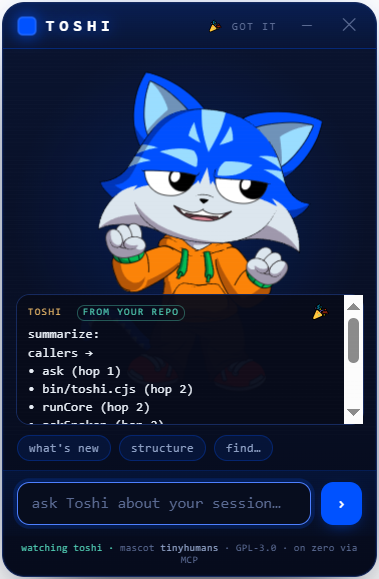
A tiny AI companion that lives beside your terminal, wearing the community-ready Toshi mascot from
tinyhumansai/mascots. It watches your gitlawb/zero
coding session and you can talk to it about what's happening — what changed, why a test is red, what to do next —
through a small, token-cheap context instead of a full chat UI.
Not a new mascot. We take the already-open-source Toshi model (PR #2, merged) and give it tools: a
zeroplugin + an MCP server + a side-panel that renders the real Rive mascot.
What it is
- Rides on
gitlawb/zero— Zero is the runtime (Go, MIT, MCP client and server). Toshi is a plugin (./.zero/plugins/toshi/) plus a stdio MCP server so any MCP client (Claude Desktop, Cline, …) can call it. - The mascot on the side —
panel/index.htmlis a WebView that loads the realtoshi.rivfrom the tinyhumans manifest and drives its state machine (idle · look_around · pointing · hand_wave · dancing · celebration, plus the eye channel). It's the face; the MCP is the brain. - Token-cheap by design — session awareness comes from
DeusData/codebase-memory-mcp(MIT): a persistent knowledge graph of the repo, ~99% fewer tokens than reading files one by one. Toshi asks it what changed instead of re-reading the tree, so most turns stay small. - You sign, always — any money action is descriptor-only: Toshi prepares a transaction, you sign it. No custody.
Layout
toshi/
├── panel/index.html      the side-panel WebView (renders the real Toshi mascot + talk-to-session)
├── mcp/toshi-mcp.mjs      the MCP server (toshi_status / toshi_ask / toshi_mood) + the /ask bridge the panel calls
├── plugin/plugin.json     the gitlawb/zero plugin manifest
├── tinyhumans/mascots.json pinned copy of the upstream manifest (the mascot contract we consume)
├── ATTRIBUTION.md         upstream credits + licences
└── LICENSE                GPL-3.0 (the Toshi mascot is GPL-3.0, so this is too)
Run it
The floating companion (Clippy-energy) — one command launches the mascot window and its brain:
npm install          # once
npm run toshi        # a frameless, always-on-top Toshi floats bottom-right, over any terminal
Launch from anywhere (Windows · macOS · Linux) — npm i -g . once, then just type toshi in any repo and
it floats over that terminal, reading that repo. Windows also has a double-clickable toshi.bat. Drag Toshi
by its header; hide it with ✕. It greets you with a wave, floats + blinks on its own, reacts when you ask, and
bursts into a celebration when it has a grounded answer from your repo.
Make its answers real — index your repo so toshi_ask reads the graph instead of guessing (token-cheap):
# get codebase-memory-mcp (MIT, local, no telemetry), then:
codebase-memory-mcp cli index_repository '{"repo_path":"/abs/path/to/your/repo"}'
# tell Toshi where the repo + binary are (optional; defaults to cwd / PATH):
export TOSHI_REPO=/abs/path/to/your/repo
export CODEBASE_MEMORY_BIN=/abs/path/to/codebase-memory-mcp
Until then Toshi runs in honest demo mode — the mascot is fully alive, and it says it can't read your session yet (with the exact index command) rather than inventing an answer.
Give Toshi a voice (optional) — install zero and run zero setup with any
provider (free/local models like ollama work). Toshi then speaks its grounded answers in your language —
1-3 warm sentences synthesized ONLY from what it retrieved, never invented. No zero? Point Toshi at any
OpenAI-compatible endpoint instead: TOSHI_API_URL + TOSHI_API_KEY + TOSHI_API_MODEL. TOSHI_LLM=off disables.
Put the CLI everywhere
The same three files run on Windows, macOS and Linux (CI-proven on all three):
| Surface | How |
|---|---|
| Any terminal (everyone) | npm i -g github:philpof102-svg/toshi — no registry needed. Then type toshi in any repo: first call floats the companion; typing toshi in another terminal connects that repo to it (no second window). Electron is optional — where it can't install, toshi runs the brain + a browser panel at http://127.0.0.1:4821/panel/ instead. |
| zero plugin | drop this repo at ./.zero/plugins/toshi/ → zero gets toshi_status / toshi_ask / toshi_mood / toshi_watch. |
| Auto-float with zero | toshi setup (or npm run zero-hook) once → a sessionStart hook makes Toshi appear (watching that repo) every time you launch zero. toshi setup --remove undoes it. |
| Summon / minimize | toshi show · toshi hide · toshi toggle from any terminal (picked up in ~4s). The ─ button folds Toshi into a small floating head — click it to expand; ✕ quits. |
| openclaude | toshi setup --mcp registers Toshi's MCP in ~/.openclaude.json → toshi_ask / toshi_status / toshi_mood / toshi_watch inside openclaude. |
| Claude Desktop / Cline / any MCP client | toshi setup --mcp --file <path-to-config>, or by hand: {"command": "node", "args": ["/abs/path/toshi/mcp/toshi-mcp.mjs"]} |
| Scripts / anything HTTP | POST http://127.0.0.1:4820/ask {"q":"…"} · POST /repo {"path":"…"} · GET /health |
| Browser (no Electron) | node serve.js → http://127.0.0.1:4821/panel/ |
Honest status
- v0, unaudited. The panel + mascot rendering are real; the MCP's "answer about your session" is a skeleton that
bridges to
codebase-memory-mcp— wire your model/provider before trusting its answers. - The Rive runtime and the
.rivload over the network in a real browser/WebView. Vendor them for offline use. - Licence: GPL-3.0 (the upstream Toshi mascot is GPL-3.0; a derivative must match it). See
ATTRIBUTION.md.
Credits
Mascot Toshi by tinyhumans (GPL-3.0). Session memory by codebase-memory-mcp (MIT). Runtime gitlawb/zero (MIT).
推荐服务器

Baidu Map
百度地图核心API现已全面兼容MCP协议,是国内首家兼容MCP协议的地图服务商。

Playwright MCP Server
一个模型上下文协议服务器,它使大型语言模型能够通过结构化的可访问性快照与网页进行交互,而无需视觉模型或屏幕截图。

Magic Component Platform (MCP)
一个由人工智能驱动的工具,可以从自然语言描述生成现代化的用户界面组件,并与流行的集成开发环境(IDE)集成,从而简化用户界面开发流程。

Audiense Insights MCP Server
通过模型上下文协议启用与 Audiense Insights 账户的交互,从而促进营销洞察和受众数据的提取和分析,包括人口统计信息、行为和影响者互动。

VeyraX
一个单一的 MCP 工具,连接你所有喜爱的工具:Gmail、日历以及其他 40 多个工具。

graphlit-mcp-server
模型上下文协议 (MCP) 服务器实现了 MCP 客户端与 Graphlit 服务之间的集成。 除了网络爬取之外,还可以将任何内容(从 Slack 到 Gmail 再到播客订阅源)导入到 Graphlit 项目中,然后从 MCP 客户端检索相关内容。

Kagi MCP Server
一个 MCP 服务器,集成了 Kagi 搜索功能和 Claude AI,使 Claude 能够在回答需要最新信息的问题时执行实时网络搜索。

e2b-mcp-server
使用 MCP 通过 e2b 运行代码。

Neon MCP Server
用于与 Neon 管理 API 和数据库交互的 MCP 服务器

Exa MCP Server
模型上下文协议(MCP)服务器允许像 Claude 这样的 AI 助手使用 Exa AI 搜索 API 进行网络搜索。这种设置允许 AI 模型以安全和受控的方式获取实时的网络信息。