
Universal API Connector MCP
Enables AI agents to connect to any API by loading OpenAPI, GraphQL, gRPC, or SOAP specs, with a built-in catalog of 2500+ public APIs, supporting secure execution, response filtering, chaining, and parallel calls.
README
<!-- mcp-name: io.github.TeodorMCP/universal-connector-mcp -->
<div align="center">
Universal API Connector MCP
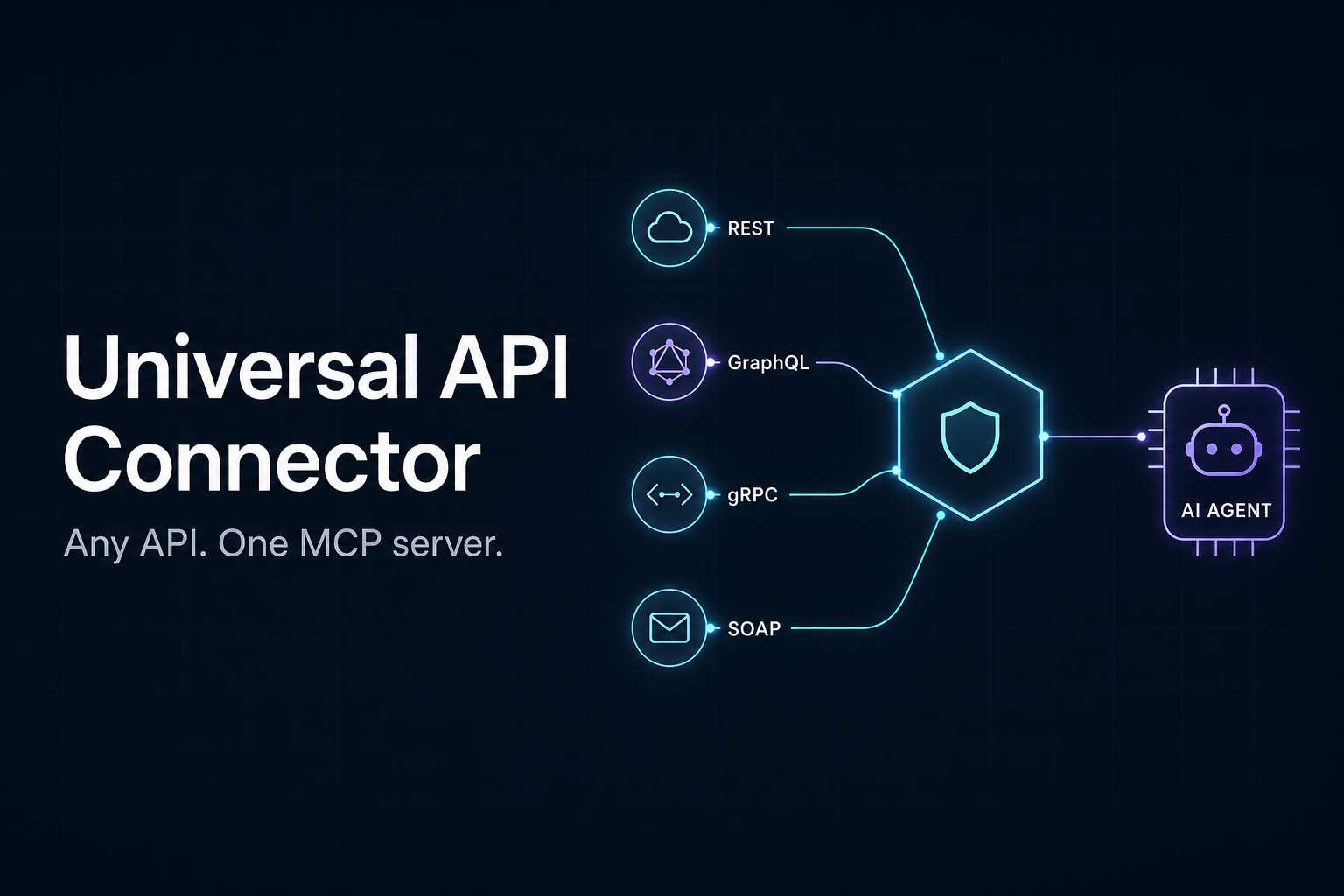
Any API. One MCP server.
Stop installing a new MCP server for every service: point this one at any OpenAPI/Swagger, GraphQL,<br> gRPC or SOAP spec - or pick one from the built-in catalog of 2500+ public APIs - and your AI agent<br> can call it. Securely, in fewer steps, with fewer tokens.



Installation · Meta-tools · API catalog · Examples · Configuration · Security
</div>
Why another one?
Most "universal API" MCP servers only speak REST/OpenAPI. This project is built around three differentiators:
- Truly universal - a normalized
Operationmodel with pluggable spec adapters (OpenAPI, GraphQL, gRPC, SOAP). Tools and executors never care which protocol produced an operation. - Security-first / local-first - a direct response to supply-chain attacks like the AgentBaiting / FakeGit campaign. Outbound requests are restricted to an allowlist, secrets never touch logs, responses are size-capped, and every call is audit-logged. No arbitrary code execution, no binary downloads, no telemetry.
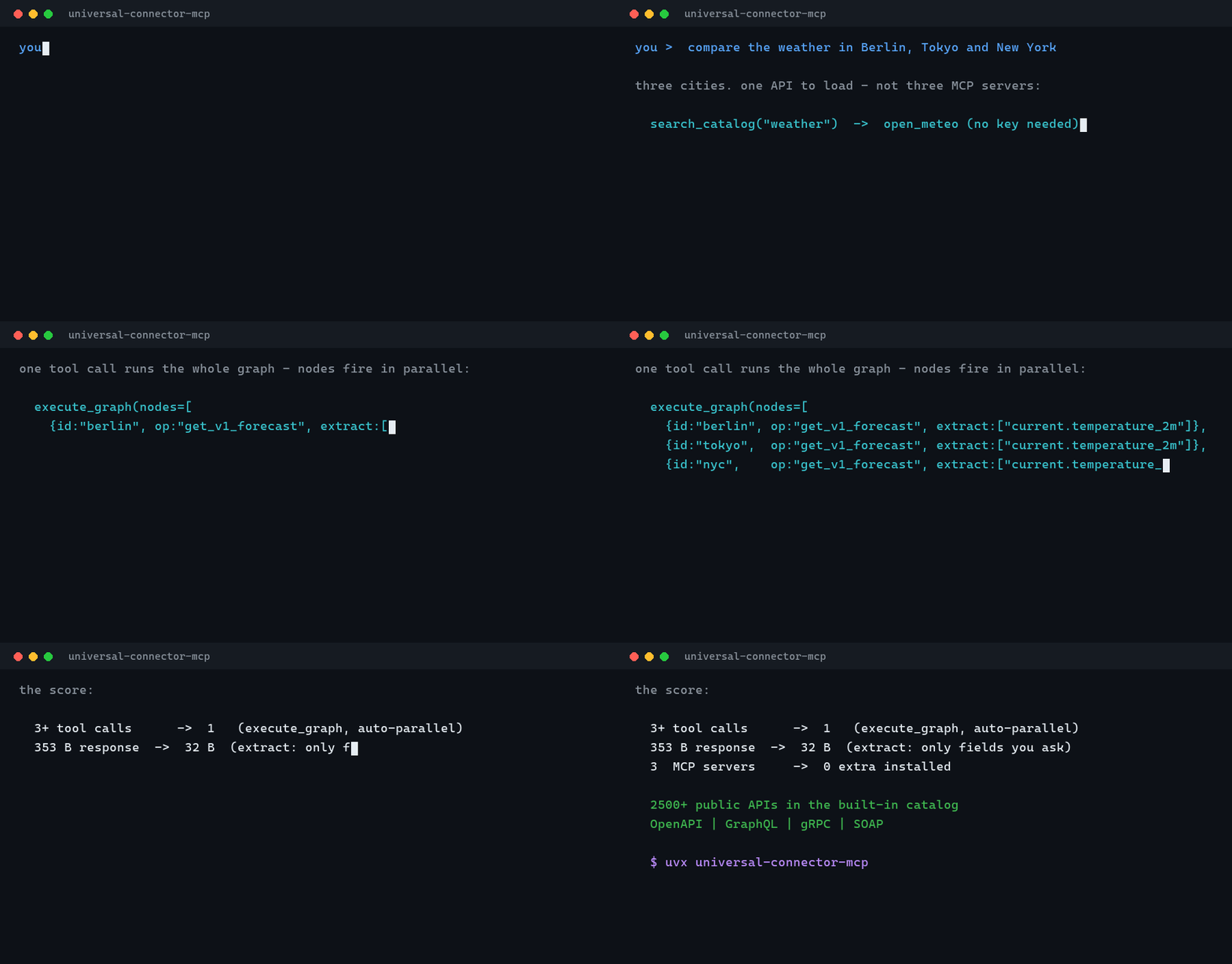
- Built for context efficiency - field-level response filtering, chained and parallel execution, and response caching mean whole workflows fit in one tool call and responses stay small.
How it works
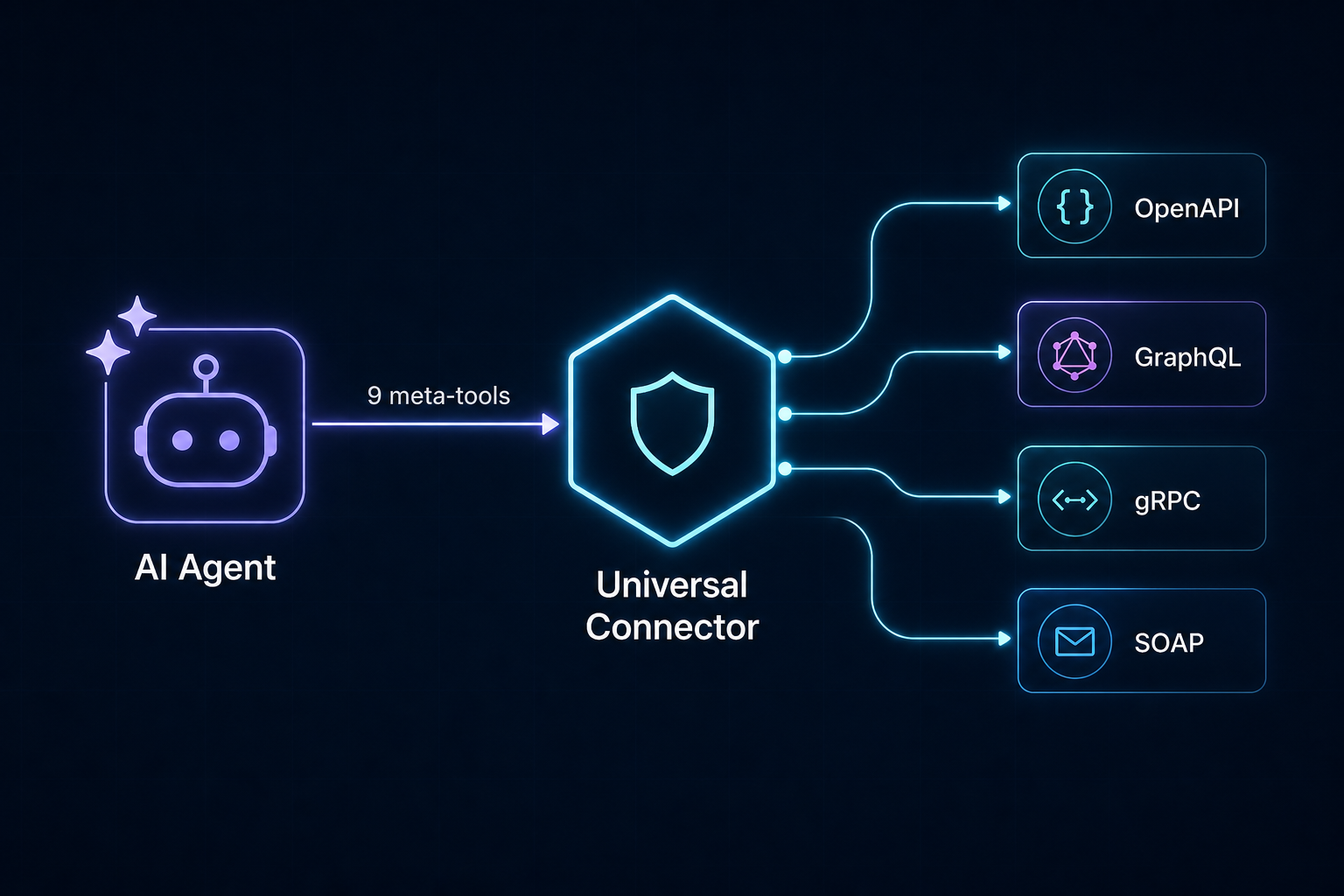
The agent explores APIs like a filesystem instead of loading hundreds of tools at once (which would blow up the context window on large APIs like Stripe). It searches for operations, inspects the ones it needs, then executes them.
<details> <summary>Architecture (click to expand)</summary>
flowchart TD
    Agent["AI Agent"] -->|"MCP stdio"| Server["FastMCP Server"]
    Server --> Tools["Meta-tools"]
    Tools --> Registry["Operation Registry (normalized)"]
    Adapters["Spec Adapters"] --> Registry
    Tools --> Guard["Security Guard"]
    Guard --> Executor["Protocol Executors"]
    Executor --> Auth["Auth Manager"]
    Executor --> UpstreamAPI["Upstream API"]
</details>
Meta-tools
| Tool | Purpose |
|---|---|
search_catalog |
Find ready-to-load public APIs (curated list + APIs.guru directory, 2500+ specs) |
load_api |
Register an API from a spec URL/file (protocol auto-detected) |
list_apis |
List loaded APIs |
search_operations |
Fuzzy-search operations across loaded APIs |
get_operation |
Full parameter/response schema for one operation |
execute |
Call an operation (auth + security guard applied); extract returns only the fields you ask for |
execute_chained |
Run a sequence of operations in one call, piping results between steps; nested lists run in parallel |
execute_graph |
Run a dependency graph of operations; order is inferred from ${id.path} references and independent nodes run in parallel automatically |
unload_api |
Remove a loaded API |
audit_log |
Recent outbound calls (method, host, path, status) |
Why fewer steps (and fewer tokens)
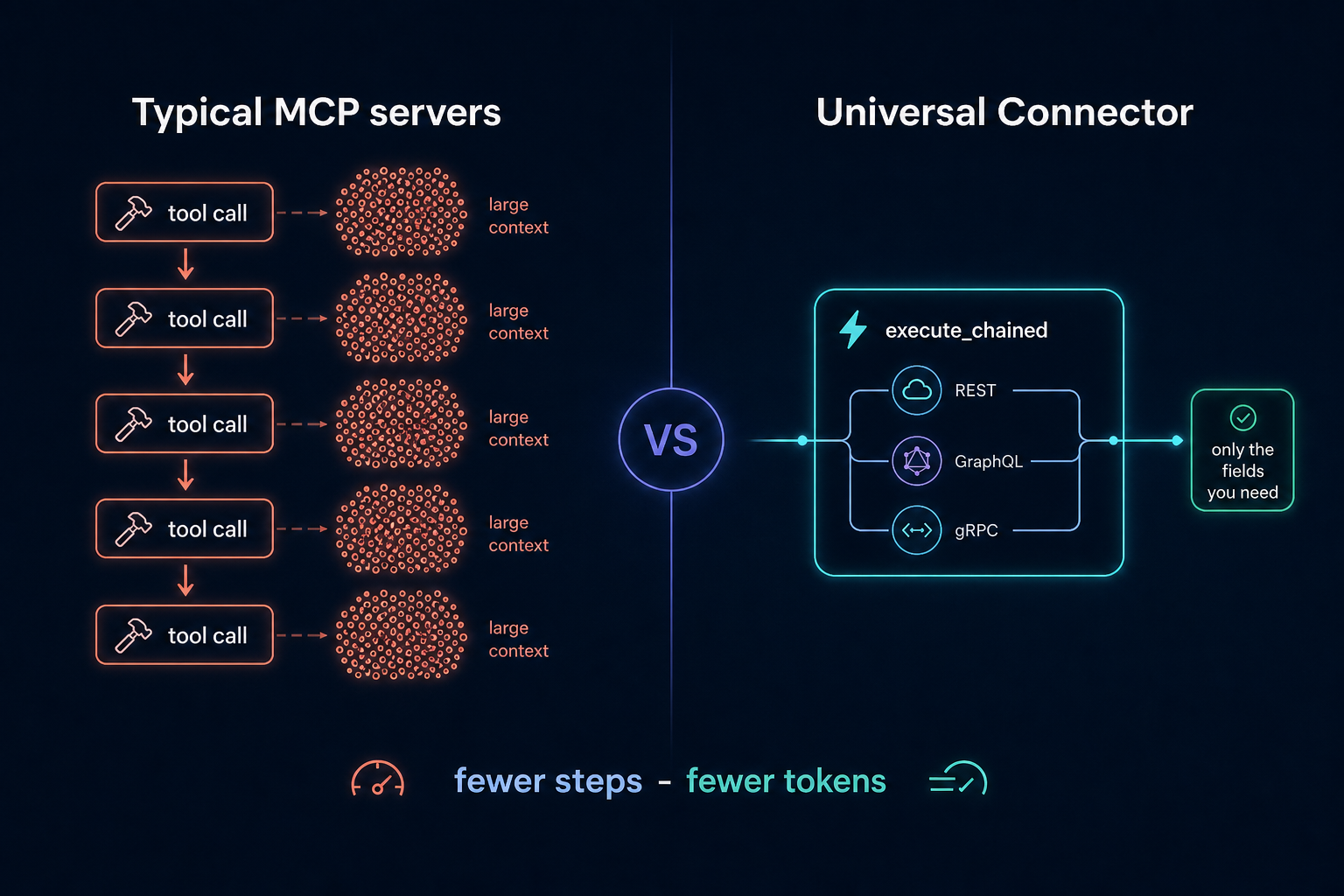
Where a per-API MCP server needs one tool round-trip per call - each returning a full JSON payload into the agent's context - this server collapses whole workflows:
extract-execute(..., extract=["items.*.name", "total_count"])returns just those fields instead of a multi-kilobyte response.*fans out over arrays.- Chaining -
execute_chainedpipes step results into later params via${save_as.path}references: one tool call instead of N. - Parallel groups - a nested list of steps runs concurrently, so "query three APIs and combine" is still one call:
execute_chained(steps=[
  [
    {"operation_id": "github.repos_get", "params": {"owner": "o", "repo": "r"},
     "save_as": "gh", "extract": ["stargazers_count"]},
    {"operation_id": "open_meteo.get_v1_forecast", "params": {"latitude": 52.5, "longitude": 13.4},
     "save_as": "weather", "extract": ["current_weather.temperature"]}
  ],
  {"operation_id": "github.issues_list_for_repo",
   "params": {"owner": "o", "repo": "r"}, "extract": ["*.title"]}
])
- Response cache - successful GET/query results are cached for
UCMCP_CACHE_TTLseconds (default 60), so repeated lookups are instant and free; passfresh: trueto bypass. Successful mutations invalidate that API's cached reads.
Built-in API catalog
You don't need to hunt for spec URLs. search_catalog searches two sources:
- A curated list of verified free/popular APIs: GitHub, GitLab, Stripe, OpenAI, Wikipedia, Open-Meteo (weather, no key), a countries GraphQL API, httpbin and the Swagger Petstore. Entries carry working spec URLs, base-URL overrides and auth hints (e.g. "optional GITHUB_TOKEN").
- The APIs.guru directory - 2500+ community-indexed OpenAPI specs (Google, AWS, Microsoft, Twilio, NASA, ...), fetched once per session and searched locally.
search_catalog(query="weather forecast")
  -> [{"name": "open_meteo", "spec": "https://...forecast.yml", "base_url": "https://api.open-meteo.com", ...}]
load_api(spec="https://...forecast.yml", name="open_meteo", base_url="https://api.open-meteo.com")
execute(operation_id="open_meteo.get_v1_forecast", params={"latitude": 52.52, "longitude": 13.41, "hourly": "temperature_2m"})
The catalog is discovery-only: it returns spec URLs, never loads or executes anything itself, so the security guard still applies to everything you load from it.
Installation
The server runs in any MCP host via uvx - no manual install needed, the package is fetched from PyPI automatically (add [all] for GraphQL/gRPC/SOAP support):
{
  "mcpServers": {
    "universal-connector": {
      "command": "uvx",
      "args": ["universal-connector-mcp"],
      "env": { "UCMCP_ALLOWED_HOSTS": "api.github.com" }
    }
  }
}
From source (development): pip install -e ".[all,dev]" and use "command": "universal-connector-mcp" instead. Extras: graphql, grpc, soap, keyring, all, dev; the core install supports OpenAPI/REST only.
Cursor

One click via the badge above, or add the JSON block to .cursor/mcp.json in your project (shared with your team) or ~/.cursor/mcp.json (personal, all projects). See examples/mcp.json for a full config with credentials.
Claude Desktop
Add the same mcpServers block to claude_desktop_config.json (Settings > Developer > Edit Config).
Claude Code
claude mcp add universal-connector -- uvx universal-connector-mcp
VS Code (Copilot)
Add the server under "servers" in .vscode/mcp.json:
{
  "servers": {
    "universal-connector": { "command": "uvx", "args": ["universal-connector-mcp"] }
  }
}
Windsurf / Cline / others
All major MCP hosts accept the same mcpServers block shown above in their respective config files (~/.codeium/windsurf/mcp_config.json, Cline's MCP settings, etc.).
AI agents installing this server for a user: follow llms-install.md.
Preloading APIs
Point UCMCP_APIS_CONFIG at a YAML file to auto-load APIs at startup - see examples/apis.example.yaml.
Managing APIs from chat
You never edit config files to manage APIs - just tell your agent:
- "Connect the Stripe API" - the agent finds it in the catalog and loads it.
- "What APIs are connected?" -
list_apisshows them. - "Forget GitHub" -
unload_apiremoves it (and from the remembered state).
When an API needs credentials, load_api tells the agent exactly which environment variable to set (e.g. STRIPE_API_KEY), whether it is already configured, and the agent relays copy-pasteable instructions - you add the variable to the env block of your MCP config and restart. Secrets are never typed into the chat.
Session persistence
The server remembers which APIs you loaded (their spec locations - never credentials or response data) in UCMCP_STATE_FILE and restores them automatically on the next start, so the agent can pick up right where it left off. Set UCMCP_STATE_FILE=off to disable.
Supported protocols
| Protocol | Spec source | Notes |
|---|---|---|
| OpenAPI / Swagger | OpenAPI 3.x or Swagger 2.0 (JSON/YAML), URL/file/raw | Core install. Local $ref resolution, all HTTP methods. |
| GraphQL | Introspection JSON or SDL | pip install '.[graphql]'. Auto-generates selection sets; execute accepts a fields override. |
| gRPC | Server reflection (grpc://host:port) |
pip install '.[grpc]'. Unary-unary methods; reflection must be enabled server-side. |
| SOAP | WSDL (URL/file/raw) | pip install '.[soap]'. One body object parameter per operation. |
Each loaded operation gets an id namespaced as <api>.<operation> (e.g. github.repos_get).
Example session
More walkthroughs (weather, GitHub with auth, GraphQL, parallel multi-API workflows, internal APIs): docs/EXAMPLES.md
search_catalog(query="github")
load_api(spec="https://raw.githubusercontent.com/github/rest-api-description/main/descriptions/api.github.com/api.github.com.json", name="github")
search_operations(query="list repositories for user", api="github")
get_operation(operation_id="github.repos_list_for_user")
execute(operation_id="github.repos_list_for_user", params={"username": "torvalds"},
        extract=["*.name", "*.stargazers_count"])
GraphQL with field selection:
load_api(spec="https://countries.trevorblades.com/", protocol="graphql", name="countries")
execute(operation_id="countries.country", params={"code": "US", "fields": "name capital currency"})
Chaining (feed one result into the next; wrap steps in a nested list to run them in parallel):
execute_chained(steps=[
  {"operation_id": "github.repos_list_for_user", "params": {"username": "torvalds"}, "save_as": "repos"},
  {"operation_id": "github.repos_get", "params": {"owner": "torvalds", "repo": "${repos.data.0.name}"},
   "extract": ["description", "stargazers_count"]}
])
Configuration
All settings are environment variables prefixed with UCMCP_:
| Variable | Default | Description |
|---|---|---|
UCMCP_ALLOWED_HOSTS |
(empty) | Comma-separated extra hosts allowed for outbound calls. Prefix with . for suffix matches. |
UCMCP_DENIED_HOSTS |
(empty) | Comma-separated hosts always blocked (wins over allow). |
UCMCP_ALLOW_ALL_HOSTS |
false |
Disable the allowlist entirely (not recommended). Does not disable private-IP blocking. |
UCMCP_BLOCK_PRIVATE_IPS |
true |
Block outbound calls that resolve to private/loopback/link-local/cloud-metadata IPs (SSRF protection). |
UCMCP_MAX_REDIRECTS |
5 |
Max HTTP redirects to follow; every hop is re-checked against the guard. |
UCMCP_MAX_RESPONSE_BYTES |
100000 |
Response body cap sent back to the agent. |
UCMCP_HTTP_TIMEOUT |
30 |
Per-request timeout (seconds). |
UCMCP_MAX_RETRIES |
2 |
Retries on transient HTTP failures (429/502/503/504). |
UCMCP_CACHE_TTL |
60 |
Seconds to cache successful GET/query responses (0 disables). |
UCMCP_AUDIT_ENABLED |
true |
Toggle audit logging. |
UCMCP_AUDIT_FILE |
(none) | Append audit entries to this file (JSON lines). |
UCMCP_USE_KEYRING |
false |
Also resolve secrets from the OS keyring. |
UCMCP_APIS_CONFIG |
(none) | Path to a YAML file of APIs to preload at startup. |
UCMCP_STATE_FILE |
~/.universal-connector-mcp/state.json |
Where loaded APIs are remembered between restarts (spec locations only - never secrets or data). Set to off to disable. |
Credentials are looked up by convention from <API_NAME>_TOKEN, <API_NAME>_API_KEY, <API_NAME>_CLIENT_ID / <API_NAME>_CLIENT_SECRET (OAuth2 client credentials), etc.
Development
pip install -e ".[all,dev]"
pytest          # run the test suite
ruff check .    # lint
The test suite (60+ tests) and lint run in CI on Ubuntu and Windows with Python 3.10 and 3.12 on every push (.github/workflows/ci.yml); tagging v* builds and publishes to PyPI via trusted publishing (.github/workflows/release.yml).
Contributions welcome - see CONTRIBUTING.md. Security reports go through private reporting.
Releases are automated: tagging v* publishes to PyPI via trusted publishing (see docs/RELEASING.md).
Security model
- Outbound allowlist - by default only hosts of explicitly loaded specs are reachable. Extend/limit via
UCMCP_ALLOWED_HOSTS/UCMCP_DENIED_HOSTS. - SSRF protection - requests that resolve to private, loopback, link-local, reserved or cloud-metadata addresses are blocked (including spec fetches, GraphQL introspection and SOAP imports). Every redirect hop is re-validated. Reaching an internal address requires an explicit
UCMCP_ALLOWED_HOSTSentry. - Secret handling - credentials come from environment variables or the OS keyring, are injected only at request time, and are redacted from audit logs and errors.
- Response caps - responses are truncated to a configurable byte limit to protect the context window.
- Audit log - method, host, path and status of every outbound call (never secrets or bodies) are recorded.
License
MIT
推荐服务器

Baidu Map
百度地图核心API现已全面兼容MCP协议,是国内首家兼容MCP协议的地图服务商。

Playwright MCP Server
一个模型上下文协议服务器,它使大型语言模型能够通过结构化的可访问性快照与网页进行交互,而无需视觉模型或屏幕截图。

Magic Component Platform (MCP)
一个由人工智能驱动的工具,可以从自然语言描述生成现代化的用户界面组件,并与流行的集成开发环境(IDE)集成,从而简化用户界面开发流程。

Audiense Insights MCP Server
通过模型上下文协议启用与 Audiense Insights 账户的交互,从而促进营销洞察和受众数据的提取和分析,包括人口统计信息、行为和影响者互动。

VeyraX
一个单一的 MCP 工具,连接你所有喜爱的工具:Gmail、日历以及其他 40 多个工具。

graphlit-mcp-server
模型上下文协议 (MCP) 服务器实现了 MCP 客户端与 Graphlit 服务之间的集成。 除了网络爬取之外,还可以将任何内容(从 Slack 到 Gmail 再到播客订阅源)导入到 Graphlit 项目中,然后从 MCP 客户端检索相关内容。

Kagi MCP Server
一个 MCP 服务器,集成了 Kagi 搜索功能和 Claude AI,使 Claude 能够在回答需要最新信息的问题时执行实时网络搜索。

e2b-mcp-server
使用 MCP 通过 e2b 运行代码。

Neon MCP Server
用于与 Neon 管理 API 和数据库交互的 MCP 服务器

Exa MCP Server
模型上下文协议(MCP)服务器允许像 Claude 这样的 AI 助手使用 Exa AI 搜索 API 进行网络搜索。这种设置允许 AI 模型以安全和受控的方式获取实时的网络信息。