
web-scraper-server
Provides browser automation and web scraping as MCP tools, enabling autonomous URL ingestion, crawling, extraction, and anti-bot handling with interactive browser control.
README
Web Scraper Toolkit






Expertly crafted by Roy Dawson IV
Use Case Synopsis
Web Scraper Toolkit is a production-grade scraping and browser automation platform for:
- Engineers and analysts who need repeatable, scriptable web extraction.
- Red/blue team workflows that need transparent anti-bot diagnostics and safe automation controls.
- Agent builders who need MCP tools for autonomous URL ingestion, crawling, extraction, and post-processing.
You can run it as:
- A CLI tool (
web-scraper) - An MCP server (
web-scraper-server) - A Python library (typed config + async APIs)
What it does (without reading code)
Core scraping and extraction
- Single-page scrape, batch scrape, and domain crawling.
- Sitemap ingestion and tree extraction.
- Markdown, text, HTML, JSON, XML, CSV, screenshot, and PDF outputs.
- Contact extraction (emails, phones, socials).
Browser intelligence and anti-bot handling
- Playwright-first automation with stealth profile controls.
- Native browser fallback routing (
chrome,msedge,chromium) when blocked. - Interactive browser MCP tools for navigate/click/type/wait/key/scroll/hover/evaluate/screenshot.
- Compact interaction-map MCP output for LLM-friendly clickable-element discovery.
- Optional accessibility-tree MCP output for role/name-first autonomous navigation.
- Script-level diagnostics for detection analysis and route optimization.
Dynamic host learning (auto-routing)
- Per-domain host profiles in
host_profiles.json. - Safe-subset auto-learning of routing strategy.
- Promotion only after clean incognito successes (default threshold: 2).
- Deterministic precedence: explicit override > host profile > global config > defaults.
Out-of-the-box behavior ("just works")
Default behavior is tuned for safety + resilience:
- Playwright Chromium is the default primary browser path.
- Incognito-style contexts by default.
- Native fallback policy defaults to
on_blocked. - Host profile learning is enabled by default.
- Host profile read-only mode is available (
host_profiles_read_only=true) to apply-only with no writes. - Host profile store is auto-created when needed.
- If host profile persistence cannot initialize, toolkit continues with clear diagnostic metadata.
- OS-level anti-bot interaction is blocked in headless mode.
- Before OS mouse takeover, toolkit warns the operator and verifies active foreground window.
- Cloudflare Turnstile challenges are handled autonomously by dynamically disabling detection-vulnerable stealth scripts to allow native auto-validation.
- Google Search (SERP) requests are automatically detected and routed through a specialized Native Chrome Hardware Spoofing bypass block to prevent
429 Too Many Requests (sorry/index)bans. - If Google enforces a persistent soft-ban, the toolkit transparently falls back to the resilient DuckDuckGo HTML endpoint to guarantee unblockable organic search extraction.
Quick Start (60 seconds)
pip install web-scraper-toolkit
playwright install
Optional desktop solver support:
pip install web-scraper-toolkit[desktop]
playwright install
Run a first scrape:
web-scraper --url https://example.com --format markdown --export
End-to-End Flow
Simple flow

Advanced flow (dynamic routing)
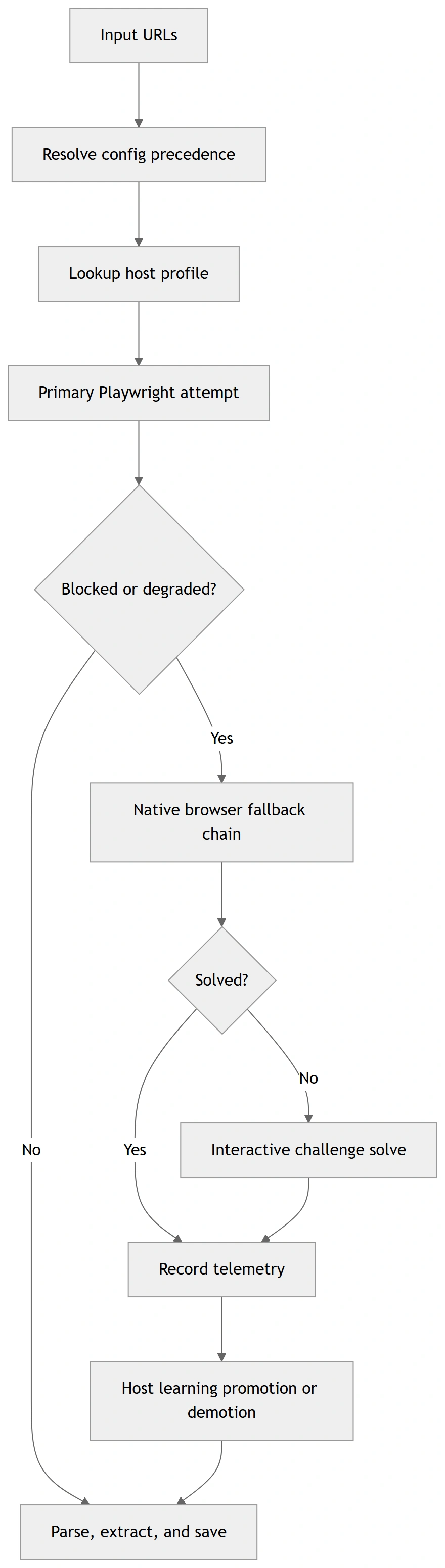
These diagrams are rendered from Mermaid source files for GitHub/PyPI compatibility. Sources:
docs/diagrams/*.mmd
How to Use It
1) CLI (fastest entry)
Minimal:
web-scraper --url https://example.com --format markdown --export
Batch + merge:
web-scraper --input urls.txt --workers auto --format text --merge --output-name merged.txt
Diagnostics wrapper:
web-scraper --run-diagnostic challenge_matrix --diagnostic-url https://target-site.tld/resource --diagnostic-runs-per-variant 2
Optional toolkit auto-commit (off by default):
web-scraper --run-diagnostic toolkit_route --diagnostic-url https://target-site.tld/resource --diagnostic-auto-commit-host-profile
Strict progression gating + artifact capture:
web-scraper \
  --run-diagnostic toolkit_route \
  --diagnostic-url https://target-site.tld/resource \
  --diagnostic-require-2xx \
  --diagnostic-save-artifacts \
  --diagnostic-artifacts-dir ./scripts/out/artifacts
Deterministic fixture replay / recording for regression analysis:
python scripts/diag_toolkit_route.py --fixture-replay ./tests/fixtures/challenge/cloudflare_blocked.json
python scripts/diag_toolkit_route.py --url https://target-site.tld/resource --fixture-record ./tests/fixtures/challenge/latest_toolkit_fixture.json
python scripts/diag_challenge_matrix.py --fixture-replay ./tests/fixtures/challenge/zoominfo_px_then_cf_loop.json
Cloudflare stealth-strategy matrix testing:
python scripts/diag_cloudflare_matrix.py --url https://target-site.tld/challenge
2) MCP (agentic mode)
Local stdio:
web-scraper-server --stdio
Remote transport:
web-scraper-server --transport streamable-http --host 127.0.0.1 --port 8000 --path /mcp
3) Python API
import asyncio
from web_scraper_toolkit.browser.config import BrowserConfig
from web_scraper_toolkit.browser.playwright_handler import PlaywrightManager

async def main() -> None:
    cfg = BrowserConfig.from_dict({
        "headless": True,
        "browser_type": "chromium",
        "native_fallback_policy": "on_blocked",
        "host_profiles_enabled": True,
        "host_profiles_path": "./host_profiles.json",
        "host_profiles_read_only": False,
    })

    async with PlaywrightManager(cfg) as manager:
        content, final_url, status = await manager.smart_fetch("https://example.com")
        print({"status": status, "url": final_url, "has_content": bool(content)})

asyncio.run(main())
Safety Model (OS input + anti-bot interactions)
When toolkit enters OS-level mouse challenge solving:
- It warns the operator before input takeover.
- It validates that the browser is foreground/active.
- It verifies click/hold coordinates are inside active window bounds.
- It refuses OS interaction in headless mode.
pyautoguifailsafe remains active (move cursor to a screen corner to abort).
Optional env override:
WST_OS_INPUT_WARNING_SECONDS(default:3)
Configuration Model
Precedence order:
- Explicit CLI/MCP arguments
- Environment variables (
WST_*) settings.local.cfg/settings.cfgconfig.json- Built-in defaults
Key files:
config.example.jsonsettings.example.cfghost_profiles.example.jsonINSTRUCTIONS.md(full operations runbook)
Full Usage and Operations
For exhaustive setup, deployment, troubleshooting, CLI/MCP option coverage, and diagnostics workflows, read:
INSTRUCTIONS.mddocs/config_schema.md(config + host profile schema contract)docs/api_stability.md(API/deprecation policy)docs/support_matrix.md(platform/browser support matrix)docs/release_checklist.md(ship checklist)
Canonical script diagnostics now use scripts/diag_*.py names.
Truthfulness note:
- challenge diagnostics now classify pages from visible text + structure, not raw HTML noise
- fixture replay is browserless and safe for deterministic regression checks
- live smoke results may still fail when a target changes, but the toolkit now reports those failures more accurately
Verified Outputs
The following output blocks are copied from deterministic command runs in this repository.
Verified Output A — diag_toolkit_zoominfo --help
Command:
python scripts/diag_toolkit_zoominfo.py --help
Expected output:
usage: diag_toolkit_zoominfo.py [-h] [--url URL] [--timeout-ms TIMEOUT_MS]
                                [--skip-interactive]
                                [--include-headless-stage]
                                [--log-level {DEBUG,INFO,WARNING,ERROR}]
                                [--auto-commit-host-profile]
                                [--host-profiles-path HOST_PROFILES_PATH]
                                [--read-only] [--require-2xx]
                                [--save-artifacts]
                                [--artifacts-dir ARTIFACTS_DIR]
Verified Output B — CLI includes strict/artifact diagnostic flags
Command:
python -m web_scraper_toolkit.cli --help
Expected excerpt:
  --diagnostic-require-2xx
                        Require final HTTP 2xx status for toolkit diagnostic
                        stage success.
  --diagnostic-save-artifacts
                        Persist per-stage diagnostic artifacts for toolkit
                        route diagnostics.
  --diagnostic-artifacts-dir DIAGNOSTIC_ARTIFACTS_DIR
                        Optional artifacts directory override for toolkit
                        route diagnostics.
Verified Output C — mocked diagnostic report payload (from deterministic test)
File/fixture expectation used in tests/test_script_diagnostics.py:
{
  "summary": {
    "progressed_stages": 1
  }
}
Production Deployment Checklist
Before release tags, execute and verify:
ruff format --check .
ruff check src
mypy
pytest -q -m "not integration"
python -m build
python -m twine check dist/*
python scripts/clean_workspace.py --dry-run
For full release/security gates, see docs/release_checklist.md.
Support Matrix
- Python: 3.10–3.13
- OS: Windows, Linux, macOS
- Native fallback channels: chrome, msedge, chromium
- Interactive OS-level challenge solving: headed desktop sessions only
Details and limitations: docs/support_matrix.md.
Author & Links
Created by: Roy Dawson IV
GitHub: https://github.com/imyourboyroy
PyPi: https://pypi.org/user/ImYourBoyRoy/
Host Profile Operator CLI
Host-learning now has an explicit operator CLI so you can inspect, diff, and manage learned routing without digging through JSON manually.
web-scraper-hosts --path ./host_profiles.json summary
web-scraper-hosts --path ./host_profiles.json inspect zoominfo.com
web-scraper-hosts --path ./host_profiles.json diff zoominfo.com
web-scraper-hosts --path ./host_profiles.json promote zoominfo.com
web-scraper-hosts --path ./host_profiles.json demote zoominfo.com
web-scraper-hosts --path ./host_profiles.json reset zoominfo.com
JSON output is available for automation:
web-scraper-hosts --path ./host_profiles.json --json inspect zoominfo.com
This keeps host-learning mutations explicit:
inspect/diff/summaryare read-onlypromote/demote/resetmutate the store intentionally
推荐服务器

Baidu Map
百度地图核心API现已全面兼容MCP协议,是国内首家兼容MCP协议的地图服务商。

Playwright MCP Server
一个模型上下文协议服务器,它使大型语言模型能够通过结构化的可访问性快照与网页进行交互,而无需视觉模型或屏幕截图。

Magic Component Platform (MCP)
一个由人工智能驱动的工具,可以从自然语言描述生成现代化的用户界面组件,并与流行的集成开发环境(IDE)集成,从而简化用户界面开发流程。

Audiense Insights MCP Server
通过模型上下文协议启用与 Audiense Insights 账户的交互,从而促进营销洞察和受众数据的提取和分析,包括人口统计信息、行为和影响者互动。

VeyraX
一个单一的 MCP 工具,连接你所有喜爱的工具:Gmail、日历以及其他 40 多个工具。

graphlit-mcp-server
模型上下文协议 (MCP) 服务器实现了 MCP 客户端与 Graphlit 服务之间的集成。 除了网络爬取之外,还可以将任何内容(从 Slack 到 Gmail 再到播客订阅源)导入到 Graphlit 项目中,然后从 MCP 客户端检索相关内容。

Kagi MCP Server
一个 MCP 服务器,集成了 Kagi 搜索功能和 Claude AI,使 Claude 能够在回答需要最新信息的问题时执行实时网络搜索。

e2b-mcp-server
使用 MCP 通过 e2b 运行代码。

Neon MCP Server
用于与 Neon 管理 API 和数据库交互的 MCP 服务器

Exa MCP Server
模型上下文协议(MCP)服务器允许像 Claude 这样的 AI 助手使用 Exa AI 搜索 API 进行网络搜索。这种设置允许 AI 模型以安全和受控的方式获取实时的网络信息。