
Weft
Enables AI assistants to access and search your local browsing knowledge graph via MCP resources and tools.
README
Weft
Local-first knowledge graph for your browsing.
Weft turns browser tabs into a searchable, clustered knowledge graph using Louvain community detection and PageRank. No cloud. No accounts. Everything runs on your machine.
Think: Obsidian graph view, but for the web you already have open.


Why Weft
You have 80 tabs open. Some are related. Some are duplicates. You can't remember what you were researching yesterday.
Weft fixes this:
- Clusters tabs by topic using graph algorithms, not manual folders
- Deduplicates with URL canonicalization + SimHash near-duplicate detection
- Tracks navigation so "A led to B" is a first-class relationship
- Runs locally — your browsing data never leaves your machine
Two Ways to Use Weft
| Chrome Extension | CLI (Python) | |
|---|---|---|
| Best for | Live tracking, visual exploration | Batch processing, scripting, MCP |
| Graph View | Interactive sidepanel with Cytoscape.js | Terminal UI with Textual |
| Clustering | Real-time Louvain | Configurable Louvain or Union-Find |
| Install | Load unpacked extension | pip install weft-graph |
Chrome Extension
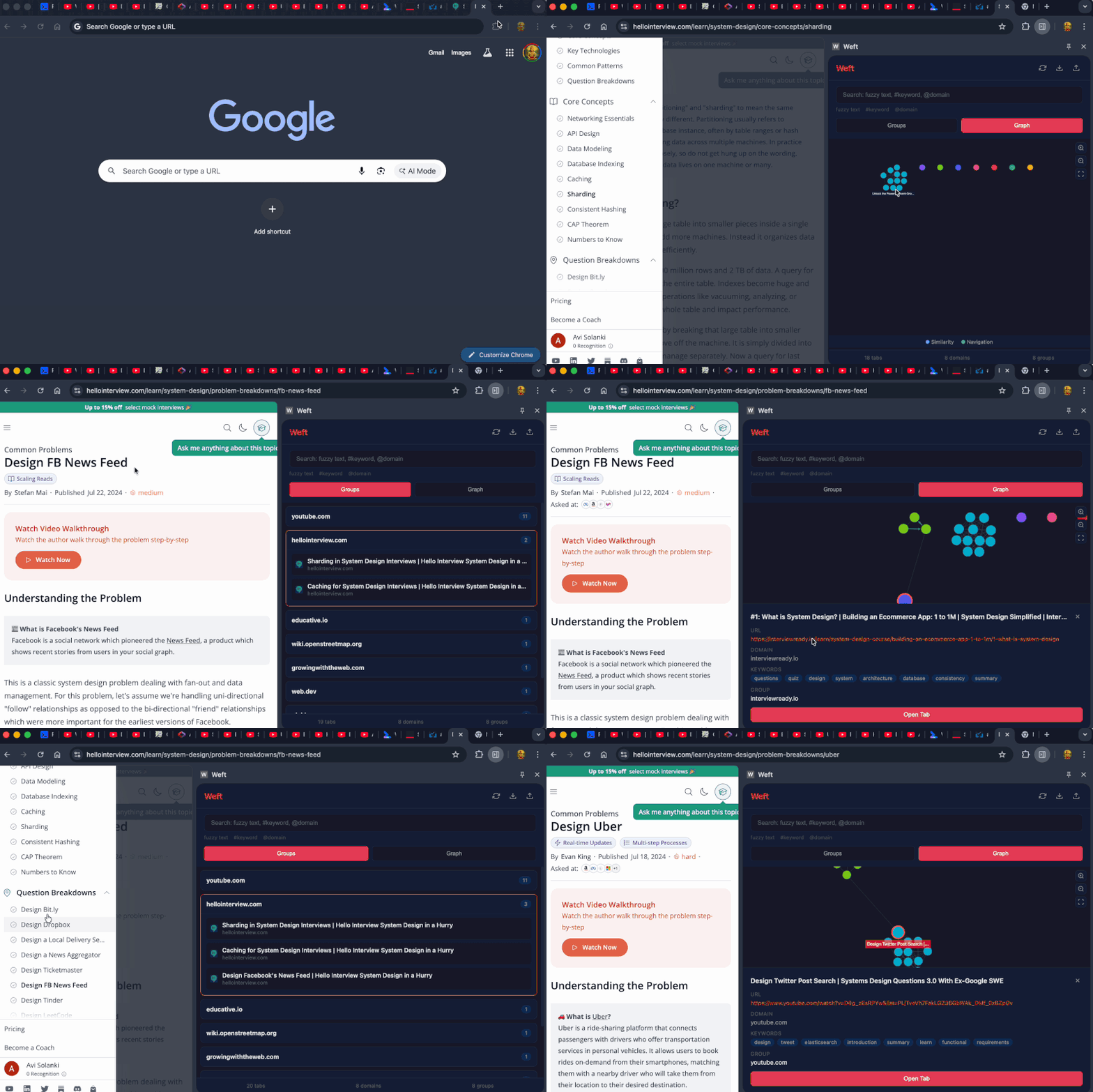
Live knowledge graph that tracks your browsing in real-time.
Features
- Live Tab Tracking — captures tabs as you browse, extracts content automatically
- Louvain Clustering — groups related pages using community detection, not arbitrary thresholds
- PageRank Sorting — most important tabs surface to the top of each group
- Navigation Edges — tracks how you move between pages, including SPA navigations
- Graph Visualization — interactive Cytoscape.js graph with color-coded clusters
- Smart Search — fuzzy text,
#keyword, and@domainfilters with search history - Group Actions — open all, close all, or copy links for any cluster
- Live Tab Indicators — see which tabs are open, closed, or stale at a glance
- Stale Tab Detection — highlights tabs you haven't touched in 24+ hours
- Keyboard Navigation — full
j/k/Enter/onavigation, vim-style - Settings — configurable server URL, auto-rebuild, stale threshold
- Onboarding — guided first-run experience
- Import/Export — JSON format compatible with CLI
- Offline Insights — browsing report works without the server
Install Extension
- Clone or download this repo
- Open Chrome →
chrome://extensions - Enable "Developer mode" (top right)
- Click "Load unpacked" → select the
extension/folder - Click the Weft icon to open the sidepanel
Keyboard Shortcuts (Extension)
| Key | Action |
|---|---|
/ |
Focus search |
g / v / i |
Switch to Groups / Graph / Insights |
r |
Rebuild graph |
j / k |
Navigate groups and tabs |
Enter |
Expand group or open tab |
o |
Open focused tab |
Esc |
Close panel / exit settings |
CLI Tool
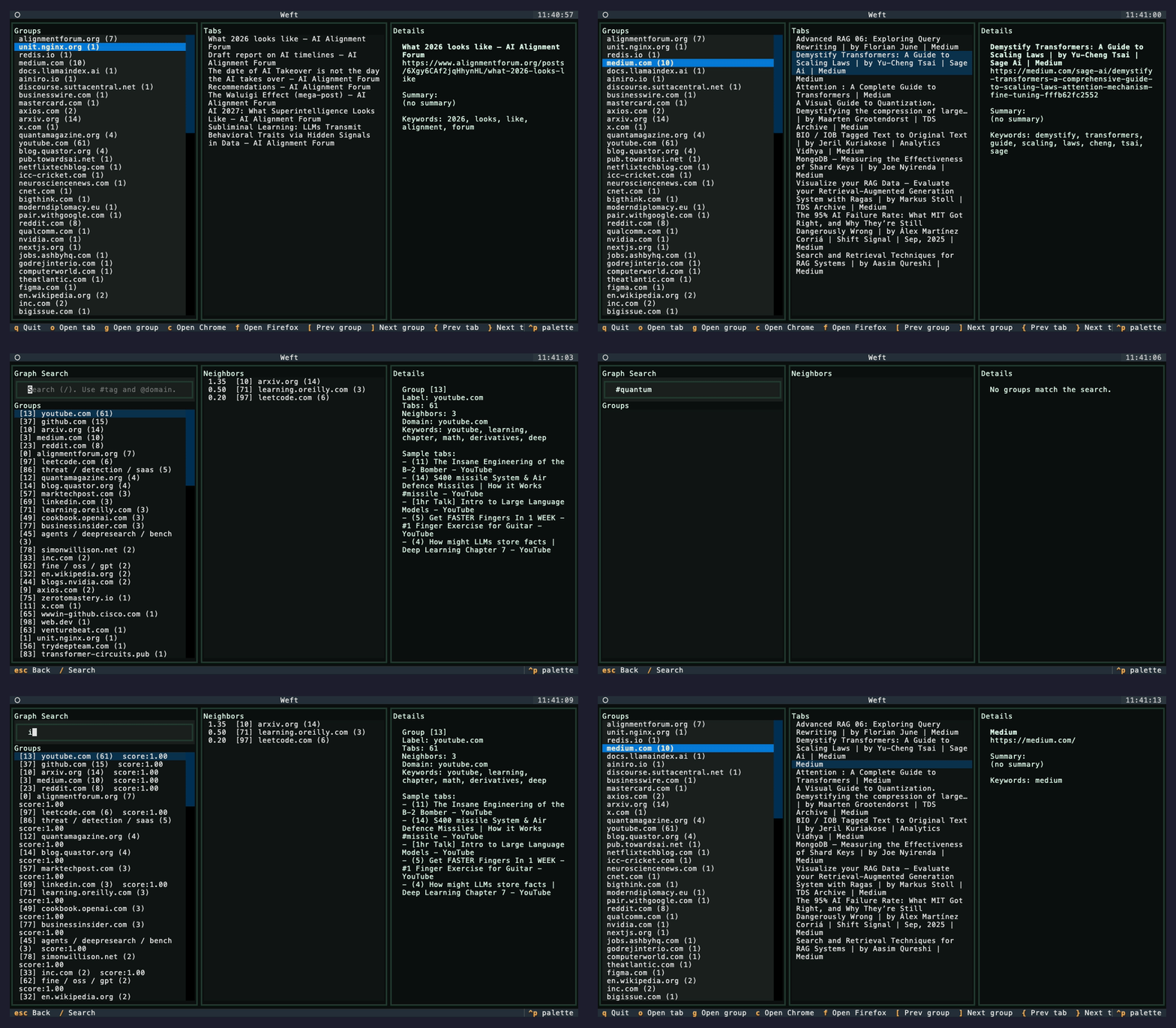
Batch processing, terminal UI, API server, and MCP integration.
Install CLI
pip install weft-graph
Or from source:
git clone https://github.com/Avi-141/weft.git
cd weft
pip install -e .
Quick Start
# Build knowledge graph from browser tabs
weft weave

# Explore in terminal UI
weft explore

# Start API + MCP server
weft serve
Commands
weft weave
Extracts tabs from browsers and builds a knowledge graph.
# Default: all browsers, Louvain clustering
weft weave

# Chrome only, fast mode (no crawling)
weft weave --browser chrome --no-crawl

# With LLM summaries (requires Ollama)
weft weave --summarize

# Legacy clustering (Union-Find + mutual KNN)
weft weave --no-louvain

# Tighter clusters
weft weave --louvain-resolution 1.5

# Looser clusters
weft weave --louvain-resolution 0.7
weft explore
Interactive TUI for browsing your knowledge graph.
weft explore
weft explore my_graph.json
weft insights
Print a markdown report of your browsing: top topics, key themes, domain breakdown.
weft insights
weft serve
Run the API and MCP server for real-time extension sync and Claude Desktop integration.
weft serve
# Runs at http://localhost:8000
weft install-mcp (macOS)
Configure Claude Desktop to talk to Weft via MCP.
weft install-mcp
Then ask Claude: "What was I researching about distributed systems?"
weft export-obsidian
Export knowledge clusters as linked markdown notes to your Obsidian vault.
weft export-obsidian "/path/to/vault"
Architecture
┌─────────────────────────────────────────────────────┐
│                    DATA SOURCES                      │
│  Chrome (AppleScript)  Firefox (sessionstore)        │
│  Chrome Extension (live capture via chrome.tabs)     │
└──────────────────────┬──────────────────────────────┘
                       │
                       ▼
┌─────────────────────────────────────────────────────┐
│                  EXTRACT + ANALYZE                   │
│  HTTP crawl (requests + trafilatura)                 │
│  Content script DOM extraction (extension)           │
│  Keyword extraction (TF) + SimHash fingerprinting    │
│  Optional: LLM summaries + embeddings (Ollama)       │
└──────────────────────┬──────────────────────────────┘
                       │
                       ▼
┌─────────────────────────────────────────────────────┐
│                    DEDUPLICATE                        │
│  Canonical URL normalization (strip tracking, www)   │
│  SimHash near-duplicate detection (same domain)      │
│  Union-Find to merge duplicate sets                  │
└──────────────────────┬──────────────────────────────┘
                       │
                       ▼
┌─────────────────────────────────────────────────────┐
│              CLUSTER (LOUVAIN + PAGERANK)             │
│  Similarity matrix (Jaccard or cosine + domain)      │
│  Louvain community detection (modularity Q)          │
│  PageRank for node importance scoring                │
│  PageRank-weighted TF-IDF group labeling             │
└──────────────────────┬──────────────────────────────┘
                       │
                       ▼
┌─────────────────────────────────────────────────────┐
│                   GRAPH OUTPUT                        │
│  { tabs, groups, edges, stats }                      │
│  schema_version: 1                                   │
│  modularity score + clustering method in stats       │
└──────┬───────────┬────────────┬─────────────────────┘
       │           │            │
       ▼           ▼            ▼
  CLI / TUI    Extension    Server / MCP
  (Textual)   (Cytoscape)   (FastAPI)
Algorithms
Louvain Community Detection
Weft uses the Louvain method for clustering tabs. Instead of forcing tabs together by domain or arbitrary thresholds, Louvain optimizes modularity — finding groups where internal similarity is denser than expected by chance.
How it works:
- Build a weighted graph from the similarity matrix (edges above threshold)
- Start with each tab in its own community
- For each tab, compute the modularity gain of moving it to each neighbor's community
- Move it to the community with the highest gain (if positive)
- Repeat until no single move improves modularity
Resolution parameter: Controls cluster granularity. Default is 1.0. Values >1.0 produce smaller, tighter clusters. Values <1.0 produce larger, looser ones.
Modularity Q: A score from -0.5 to 1.0 measuring cluster quality. Values above 0.3 indicate meaningful community structure. Weft reports this in graph stats and the extension UI.
PageRank
Each tab gets a PageRank score based on its position in the similarity graph. Tabs that are highly connected to other important tabs rank higher.
Used for:
- Sorting — tabs within each group are ordered by importance
- Labeling — group labels are generated using PageRank-weighted TF-IDF, so the label reflects the most central content in the cluster, not just the most frequent words
Similarity
| Mode | Method | When |
|---|---|---|
| Default | Jaccard similarity on extracted keywords | Always available |
| Embeddings | Cosine similarity on vector embeddings | With --summarize (Ollama) |
| Domain bonus | +0.25 for same-domain tabs | Always applied |
All scores are clamped to [0, 1].
Deduplication
Two-stage deduplication using Union-Find:
- Canonical URL — normalize URLs (strip tracking params, www, fragments) and merge exact matches
- SimHash — 64-bit locality-sensitive hash of page content; tabs with Hamming distance ≤ 3 on the same domain are merged as near-duplicates
Edge Types
| Type | Description | Weight |
|---|---|---|
| Similarity | Tabs with related content | 0–1.0 (Jaccard/cosine) |
| Similarity+Domain | Similar content + same domain | 0–1.0 |
| Navigation | User clicked from A to B | 1.0 |
MCP Integration
Weft exposes your browsing context to AI assistants via the Model Context Protocol.
Resources:
browsing://insights— browsing memory report with top topics, themes, sourcesbrowsing://groups— all clusters with labels, keywords, domains, sizesbrowsing://stats— graph metrics: tab count, modularity, clustering method
Tools:
search_knowledge(query)— ranked search across titles, summaries, keywords, URLs. Scores by keyword overlap + PageRank.get_group_details(group_id)— cluster deep-dive: synthesized summary, tabs sorted by PageRank, top keywords and domainsget_tab_neighbors(tab_id)— graph neighborhood: all tabs connected by similarity or navigation edges, with edge weightsfind_recent_tabs(hours)— temporal query: tabs active within the last N hoursfind_stale_tabs(stale_hours)— cleanup candidates: tabs not accessed in N+ hours, sorted by stalenessfind_related_to_topic(topic)— topic expansion: finds direct keyword matches, then follows graph edges to discover related content you wouldn't find by search alone
# Install MCP for Claude Desktop
weft install-mcp

# Start the server
weft serve
Example prompts for Claude:
- "What was I researching about Python async?"
- "Show me tabs related to database optimization"
- "What have I been browsing in the last 2 hours?"
- "Find stale tabs I should close"
- "What's connected to the React hooks guide I was reading?"
Requirements
Extension
- Chrome or Chromium browser
CLI
- Python 3.9+
- macOS or Windows
- Chrome and/or Firefox
Optional
# LLM summaries (embedding-based clustering)
brew install ollama
ollama pull llama3.1:8b
ollama pull nomic-embed-text
weft weave --summarize

# Firefox tab export
pip install lz4

# JS-heavy page rendering
pip install playwright
Privacy
Weft is fully local:
- Extension stores data in IndexedDB (browser-local)
- CLI stores data in local JSON files
- No analytics, no telemetry, no cloud sync
- Network access only for fetching URLs you provide and optional Ollama calls on localhost
License
MIT
推荐服务器

Baidu Map
百度地图核心API现已全面兼容MCP协议,是国内首家兼容MCP协议的地图服务商。

Playwright MCP Server
一个模型上下文协议服务器,它使大型语言模型能够通过结构化的可访问性快照与网页进行交互,而无需视觉模型或屏幕截图。

Magic Component Platform (MCP)
一个由人工智能驱动的工具,可以从自然语言描述生成现代化的用户界面组件,并与流行的集成开发环境(IDE)集成,从而简化用户界面开发流程。

Audiense Insights MCP Server
通过模型上下文协议启用与 Audiense Insights 账户的交互,从而促进营销洞察和受众数据的提取和分析,包括人口统计信息、行为和影响者互动。

VeyraX
一个单一的 MCP 工具,连接你所有喜爱的工具:Gmail、日历以及其他 40 多个工具。

graphlit-mcp-server
模型上下文协议 (MCP) 服务器实现了 MCP 客户端与 Graphlit 服务之间的集成。 除了网络爬取之外,还可以将任何内容(从 Slack 到 Gmail 再到播客订阅源)导入到 Graphlit 项目中,然后从 MCP 客户端检索相关内容。

Kagi MCP Server
一个 MCP 服务器,集成了 Kagi 搜索功能和 Claude AI,使 Claude 能够在回答需要最新信息的问题时执行实时网络搜索。

e2b-mcp-server
使用 MCP 通过 e2b 运行代码。

Neon MCP Server
用于与 Neon 管理 API 和数据库交互的 MCP 服务器

Exa MCP Server
模型上下文协议(MCP)服务器允许像 Claude 这样的 AI 助手使用 Exa AI 搜索 API 进行网络搜索。这种设置允许 AI 模型以安全和受控的方式获取实时的网络信息。