
xbsl-mcp
Enables AI agents to lint, search documentation, and perform metadata scaffolding for 1C:Element projects.
README
XBSL
English · Русский
Documentation: docs.keyfire.ru/xbsl

The XBSL (1C:Element) toolkit: a linter with autofixes, an LSP server, a project index,
platform documentation search, metadata scaffolding and an MCP server for AI agents.
It works on Name.yaml (element description) and Name.xbsl (code module) pairs –
before the server-side compilation that happens on deploy.
Before 0.16 the project was named xbsl-lint (the
xbsllintpackage); the old commands, imports, env vars and entry-point groups keep working as aliases.
Not affiliated with 1C. "1C:Element", "1C:Fresh" and related names are trademarks of their respective owners. Language data is generated from your own distribution. See NOTICE.
Development notes and updates (in Russian): the 1C × AI: engineering workshop Telegram channel.
Why
1C:Element has no external tooling: the only code check is the server-side compilation on deploy – it is slow and knows nothing about project conventions. xbsl gives fast local feedback, catches what the compiler does not check at all, and takes over the metadata mechanics – creating objects, attributes and forms.
How it works
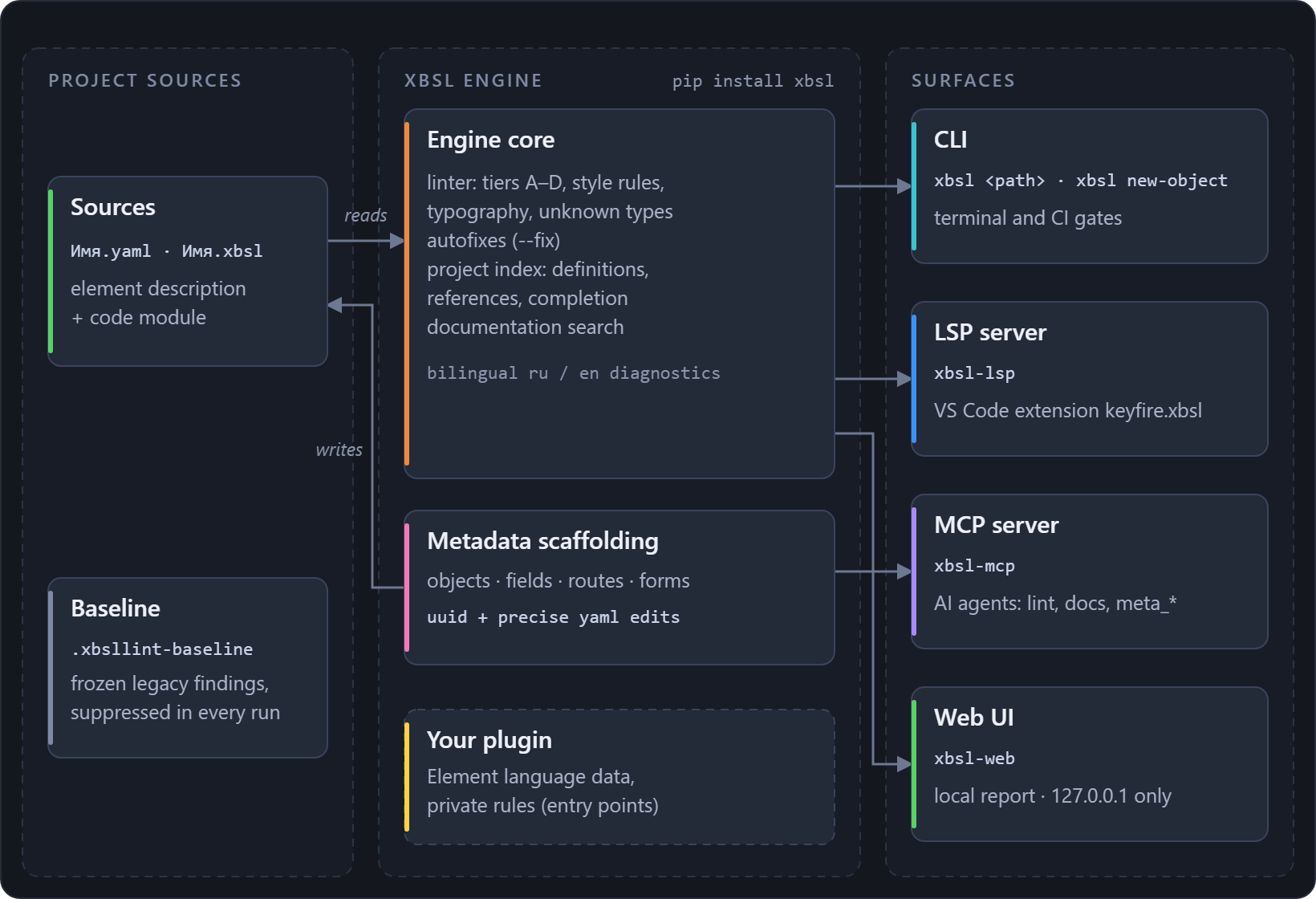
One engine, four surfaces. The core reads the <element>.yaml + <element>.xbsl pairs, and the scaffolding
writes them back; the CLI, the LSP server, the MCP server and the web UI are thin adapters over
the same core, so every surface sees the same rules, data and templates:
Quick start
Step 1 – install.
pip install xbsl # or from a clone of the repository: pip install -e .
Step 2 – generate the language data. The linter relies on tables extracted from your 1C:Element distribution (keywords, the stdlib type catalog, the configuration metamodel, terms, the documentation index, the component schema); they are NOT bundled in this repository:
xbsl extract --dist "<path to the 1C:Element distribution>"
The command runs every extractor in one go (python tools/extract.py from a clone is the same
entry point; --only picks a subset), auto-detects the platform version and places the data
under xbsl/data/element/ (gitignored). Details – data location, private data packages –
in the guide.
Step 3 – run.
xbsl path/to/sources        # or: python -m xbsl path/to/sources
xbsl data-diff              # what changed in the platform between two data versions
xbsl self-update            # upgrade to the latest PyPI version, safe with busy exe stubs
The main flags: --list-rules, --fix, --select/--enable/--ignore,
--baseline/--write-baseline, --format text|json|codeclimate, --lang ru|en. The full
flag reference, the --stdin/--index editor modes, native mypyc wheels and the self-update
mechanics – in the guide.
What it does
Rules. 123 rules in four tiers: A – structure and yaml schema, B – text and
typography conventions, C – code structure (blocks, brackets, unused locals, the style/
code conventions), D – semantics against the platform data and the project itself: every
type position in code and yaml, enumeration values, Query{...} block tables, cross-file
consistency, the types of attached .xlib libraries. The full list with severities and
documentation links – docs/RULES.md;
at runtime – xbsl --list-rules; what tier D verifies in depth –
the guide.
Autofixes. --fix repairs the mechanical findings in place – trailing whitespace,
typography characters, mixed newlines – and only them: anything needing judgment is never
touched.
Baseline. Adopt a rule on a legacy codebase without drowning: freeze the current findings once, hold only new code to the rule; the same file records point exclusions with reasons. Details.
Metadata scaffolding. Creating objects, attributes, routes and forms without hand-writing
yaml: 33 element kinds, forms generated with real content, context-aware rename-object,
access-control editing. The same operations through the CLI, MCP and LSP:
xbsl new-object vendor/App/Main Catalog Goods            # the kind in either language
xbsl add-field vendor/App/Main/Goods.yaml <section> Color --type <type>
xbsl add-form . --name Goods                            # object + list forms, registered
xbsl rename-object . Goods Products                     # rename files + update references
The platform is bilingual: an element kind has an English name and a Russian one for the
same thing, and the tool takes either spelling (the kinds are resolved through the term dictionary
extracted from your distribution). Section names of add-field still go in the project's own
language; xbsl new-object --help lists the kinds it can create.
All subcommands with their options – the guide.
Editors. The VS Code extension
(Marketplace,
Open VSX): syntax highlighting, live and
project-wide diagnostics, go-to-definition and completion, the form designer, a metadata tree and
a deploy button. Under the hood is xbsl-lsp – a Language Server any LSP-capable editor can
spawn (details).
Code templates. Type the first letters of a construct, press Ctrl+Space – get the whole
construct with edit points.
51 builtin templates (each one parsed by the linter's own parser, so it cannot insert broken
code), your own in .xbsl-templates.json, a management panel in VS Code; the mechanism and
file format mirror 1C:EDT.
Details.
Documentation search. tools/extract_docs.py turns the distribution's Element reference
into a local full-text docs.sqlite; the xbsl.docs API and the MCP tools search it.
Details.
MCP server. claude mcp add xbsl -- xbsl-mcp: linting, documentation search,
type_members and every scaffolding operation as meta_* tools – an agent creates an object
and gets the lint of the written files in one round trip.
Details.
Web interface. xbsl-web – a local page over the same engine: rule toggles, filters,
themes. Details.
CI. The exit code is non-zero only on error-severity findings, so xbsl gates a pipeline
as-is; --format codeclimate feeds the GitLab Code Quality widget. Ready-made GitHub
Actions and GitLab CI jobs –
the guide.
Extending. Entry points let a private package add rules, ship language data and override
severities without forking; XBSL_NO_PLUGINS=1 turns every plugin off.
Details.
Output language (RU/EN), Element data versions and the data root resolution order are also covered in the guide.
Tests
pip install -e ".[dev]"
pytest
Data-dependent tests are skipped automatically when the data has not been generated.
License
MIT – see LICENSE. Trademarks and data provenance – NOTICE. How to add a rule – CONTRIBUTING.md. Release history – CHANGELOG.md.
推荐服务器

Baidu Map
百度地图核心API现已全面兼容MCP协议,是国内首家兼容MCP协议的地图服务商。

Playwright MCP Server
一个模型上下文协议服务器,它使大型语言模型能够通过结构化的可访问性快照与网页进行交互,而无需视觉模型或屏幕截图。

Magic Component Platform (MCP)
一个由人工智能驱动的工具,可以从自然语言描述生成现代化的用户界面组件,并与流行的集成开发环境(IDE)集成,从而简化用户界面开发流程。

Audiense Insights MCP Server
通过模型上下文协议启用与 Audiense Insights 账户的交互,从而促进营销洞察和受众数据的提取和分析,包括人口统计信息、行为和影响者互动。

VeyraX
一个单一的 MCP 工具,连接你所有喜爱的工具:Gmail、日历以及其他 40 多个工具。

graphlit-mcp-server
模型上下文协议 (MCP) 服务器实现了 MCP 客户端与 Graphlit 服务之间的集成。 除了网络爬取之外,还可以将任何内容(从 Slack 到 Gmail 再到播客订阅源)导入到 Graphlit 项目中,然后从 MCP 客户端检索相关内容。

Kagi MCP Server
一个 MCP 服务器,集成了 Kagi 搜索功能和 Claude AI,使 Claude 能够在回答需要最新信息的问题时执行实时网络搜索。

e2b-mcp-server
使用 MCP 通过 e2b 运行代码。

Neon MCP Server
用于与 Neon 管理 API 和数据库交互的 MCP 服务器

Exa MCP Server
模型上下文协议(MCP)服务器允许像 Claude 这样的 AI 助手使用 Exa AI 搜索 API 进行网络搜索。这种设置允许 AI 模型以安全和受控的方式获取实时的网络信息。