
mcp-pandoc 精选
使用 Pandoc 的 MCP 服务器,用于无缝文档格式转换,支持 Markdown、HTML、PDF、DOCX (.docx)、csv 等格式。
Tools
convert-contents
Converts content between different formats. Transforms input content from any supported format into the specified output format. 🚨 CRITICAL REQUIREMENTS - PLEASE READ: 1. PDF Conversion: * You MUST install TeX Live BEFORE attempting PDF conversion: * Ubuntu/Debian: `sudo apt-get install texlive-xetex` * macOS: `brew install texlive` * Windows: Install MiKTeX or TeX Live from https://miktex.org/ or https://tug.org/texlive/ * PDF conversion will FAIL without this installation 2. File Paths - EXPLICIT REQUIREMENTS: * When asked to save or convert to a file, you MUST provide: - Complete directory path - Filename - File extension * Example request: 'Write a story and save as PDF' * You MUST specify: '/path/to/story.pdf' or 'C:\Documents\story.pdf' * The tool will NOT automatically generate filenames or extensions 3. File Location After Conversion: * After successful conversion, the tool will display the exact path where the file is saved * Look for message: 'Content successfully converted and saved to: [file_path]' * You can find your converted file at the specified location * If no path is specified, files may be saved in system temp directory (/tmp/ on Unix systems) * For better control, always provide explicit output file paths Supported formats: - Basic formats: txt, html, markdown - Advanced formats (REQUIRE complete file paths): pdf, docx, rst, latex, epub ✅ CORRECT Usage Examples: 1. 'Convert this text to HTML' (basic conversion) - Tool will show converted content 2. 'Save this text as PDF at /documents/story.pdf' - Correct: specifies path + filename + extension - Tool will show: 'Content successfully converted and saved to: /documents/story.pdf' ❌ INCORRECT Usage Examples: 1. 'Save this as PDF in /documents/' - Missing filename and extension 2. 'Convert to PDF' - Missing complete file path When requesting conversion, ALWAYS specify: 1. The content or input file 2. The desired output format 3. For advanced formats: complete output path + filename + extension Example: 'Convert this markdown to PDF and save as /path/to/output.pdf' Note: After conversion, always check the success message for the exact file location.
README
mcp-pandoc:文档转换 MCP 服务器
已正式包含在 模型上下文协议服务器 开源项目中。🎉
<a href="https://glama.ai/mcp/servers/xyzzgaj9bk"><img width="380" height="200" src="https://glama.ai/mcp/servers/xyzzgaj9bk/badge" /></a> <a href="https://smithery.ai/server/mcp-pandoc"><img alt="Smithery Badge" src="https://smithery.ai/badge/mcp-pandoc"></a>
概述
一个使用 pandoc 进行文档格式转换的模型上下文协议服务器。该服务器提供在不同文档格式之间转换内容的工具,同时保留格式和结构。
请注意,mcp-pandoc 目前处于早期开发阶段。PDF 支持正在开发中,随着我们不断改进服务器,功能和可用工具可能会发生变化和扩展。
鸣谢:本项目使用 Pandoc Python 包 进行文档转换,构成了本项目的基础。
演示
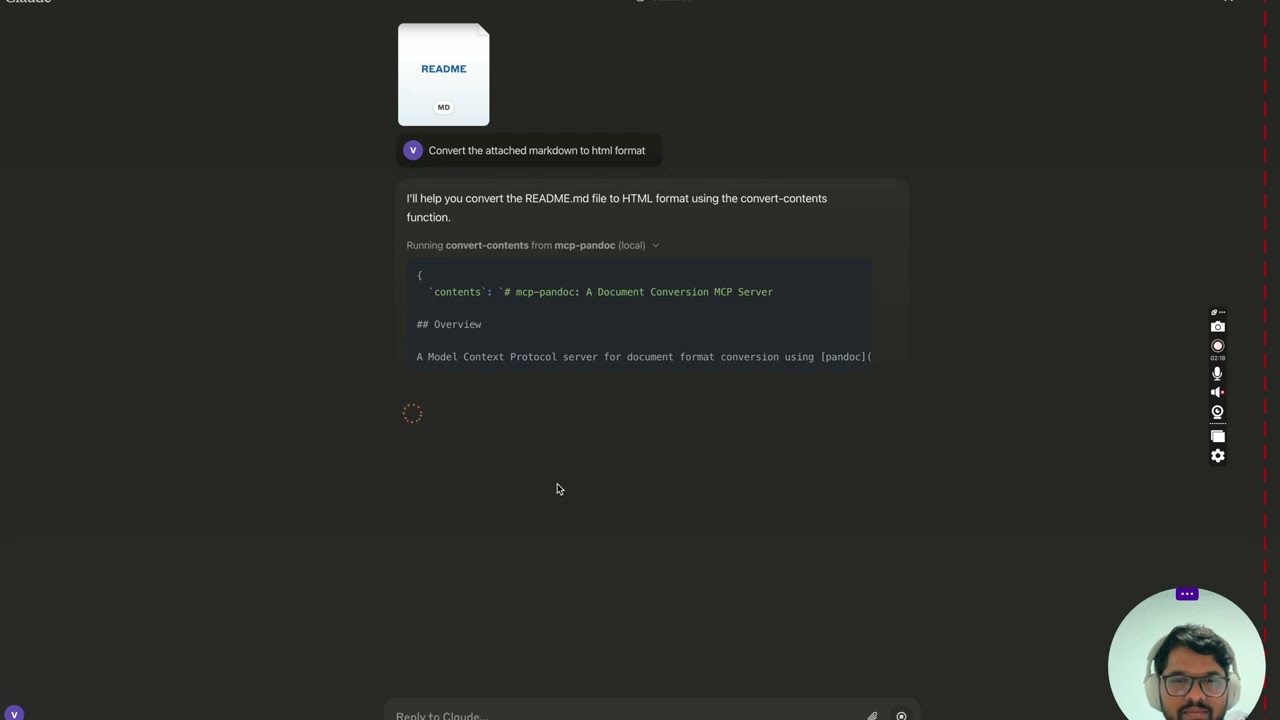
<details> <summary>屏幕截图</summary>
<img width="2407" alt="Screenshot 2024-12-26 at 3 33 54 PM" src="https://github.com/user-attachments/assets/ce3f5396-252a-4bba-84aa-65b2a06b859e" /> <img width="2052" alt="Screenshot 2024-12-26 at 3 38 24 PM" src="https://github.com/user-attachments/assets/8c525ad1-b184-41ca-b068-7dd34b60b85d" /> <img width="1498" alt="Screenshot 2024-12-26 at 3 40 51 PM" src="https://github.com/user-attachments/assets/a1e0682d-fe44-40b6-9988-bf805627beeb" /> <img width="760" alt="Screenshot 2024-12-26 at 3 41 20 PM" src="https://github.com/user-attachments/assets/1d7f5998-6d7f-48fa-adcf-fc37d0521213" /> <img width="1493" alt="Screenshot 2024-12-26 at 3 50 27 PM" src="https://github.com/user-attachments/assets/97992c5d-8efc-40af-a4c3-94c51c392534" /> </details>
更多内容即将推出...
工具
convert-contents- 在支持的格式之间转换内容
- 输入:
contents(字符串):要转换的源内容(如果未提供 input_file,则为必需)input_file(字符串):输入文件的完整路径(如果未提供 contents,则为必需)input_format(字符串):内容的源格式(默认为 markdown)output_format(字符串):目标格式(默认为 markdown)output_file(字符串):输出文件的完整路径(pdf、docx、rst、latex、epub 格式需要)
- 支持的输入/输出格式:
- markdown
- html
- docx
- rst
- latex
- epub
- txt
- 注意:对于高级格式(pdf、docx、rst、latex、epub),需要 output_file 路径
支持的格式
当前支持的格式:
基本格式(直接转换):
- 纯文本 (.txt)
- Markdown (.md)
- HTML (.html)
高级格式(需要完整文件路径):
- PDF (.pdf) - 需要安装 TeX Live
- DOCX (.docx)
- RST (.rst)
- LaTeX (.tex)
- EPUB (.epub)
注意:对于高级格式:
- 需要包含文件名和扩展名的完整文件路径
- PDF 转换需要安装 TeX Live(请参阅“关键要求”部分 -> 对于 macOS:
brew install texlive) - 如果未指定输出路径:
- 基本格式:在聊天中显示转换后的内容
- 高级格式:可能会保存在系统临时目录中(Unix 系统上的 /tmp/)
用法和配置
要使用已发布的版本
{
  "mcpServers": {
    "mcp-pandoc": {
      "command": "uvx",
      "args": ["mcp-pandoc"]
    }
  }
}
⚠️ 重要提示
关键要求
-
PDF 转换先决条件
-
尝试 PDF 转换之前必须安装 TeX Live
-
安装命令:
# Ubuntu/Debian
sudo apt-get install texlive-xetex

# macOS
brew install texlive

# Windows
# 从以下位置安装 MiKTeX 或 TeX Live:
# https://miktex.org/ 或 https://tug.org/texlive/
-
-
文件路径要求
- 保存或转换文件时,您必须提供包含文件名和扩展名的完整文件路径
- 该工具不会自动生成文件名或扩展名
示例
✅ 正确用法:
# 将内容转换为 PDF
"将此文本转换为 PDF 并另存为 /path/to/document.pdf"

# 在文件格式之间转换
"将 /path/to/input.md 转换为 PDF 并另存为 /path/to/output.pdf"
❌ 错误用法:
# 缺少文件名和扩展名
"将此另存为 /documents/ 中的 PDF"

# 缺少完整路径
"将此转换为 PDF"

# 缺少扩展名
"另存为 /documents/story"
常见问题和解决方案
-
PDF 转换失败
- 错误:“找不到 xelatex”
- 解决方案:首先安装 TeX Live(请参阅上面的安装命令)
-
文件转换失败
- 错误:“无效的文件路径”
- 解决方案:提供包含文件名和扩展名的完整路径
- 示例:
/path/to/document.pdf而不仅仅是/path/to/
-
格式转换失败
- 错误:“不支持的格式”
- 解决方案:仅使用支持的格式:
- 基本:txt、html、markdown
- 高级:pdf、docx、rst、latex、epub
快速入门
安装
选项 1:通过 claude_desktop_config.json 配置文件手动安装
- 在 MacOS 上:
open ~/Library/Application\ Support/Claude/claude_desktop_config.json - 在 Windows 上:
%APPDATA%/Claude/claude_desktop_config.json
<details> <summary>开发/未发布的服务器配置</summary>
ℹ️ 将 <DIRECTORY> 替换为您本地克隆的项目路径
"mcpServers": {
  "mcp-pandoc": {
    "command": "uv",
    "args": [
      "--directory",
      "<DIRECTORY>/mcp-pandoc",
      "run",
      "mcp-pandoc"
    ]
  }
}
</details>
<details> <summary>已发布的服务器配置</summary>
"mcpServers": {
  "mcp-pandoc": {
    "command": "uvx",
    "args": [
      "mcp-pandoc"
    ]
  }
}
</details>
选项 2:通过 Smithery 自动安装已发布的服务器配置
运行以下 bash 命令,通过 Smithery 为 Claude Desktop 自动安装已发布的 mcp-pandoc pypi:
npx -y @smithery/cli install mcp-pandoc --client claude
注意:要使用本地配置的 mcp-pandoc,请按照上面的“开发/未发布的服务器配置”步骤操作。
开发
构建和发布
要准备用于分发的软件包:
- 同步依赖项并更新锁定文件:
uv sync
- 构建软件包分发:
uv build
这将在 dist/ 目录中创建源和 wheel 分发。
- 发布到 PyPI:
uv publish
注意:您需要通过环境变量或命令标志设置 PyPI 凭据:
- 令牌:
--token或UV_PUBLISH_TOKEN - 或用户名/密码:
--username/UV_PUBLISH_USERNAME和--password/UV_PUBLISH_PASSWORD
调试
由于 MCP 服务器通过 stdio 运行,因此调试可能具有挑战性。为了获得最佳的调试 体验,我们强烈建议使用 MCP Inspector。
您可以通过 npm 使用以下命令启动 MCP Inspector:
npx @modelcontextprotocol/inspector uv --directory /Users/vivekvells/Desktop/code/ai/mcp-pandoc run mcp-pandoc
启动后,Inspector 将显示一个 URL,您可以在浏览器中访问该 URL 以开始调试。
贡献
我们欢迎您为增强 mcp-pandoc 做出贡献!以下是您可以参与的方式:
- 报告问题:发现错误或有功能请求?在我们的 GitHub Issues 页面上打开一个 issue。
- 提交 Pull Request:通过创建 pull request 来改进代码库或添加功能。
推荐服务器

Playwright MCP Server
一个模型上下文协议服务器,它使大型语言模型能够通过结构化的可访问性快照与网页进行交互,而无需视觉模型或屏幕截图。

Neon MCP Server
用于与 Neon 管理 API 和数据库交互的 MCP 服务器

mcp-server-qdrant
这个仓库展示了如何为向量搜索引擎 Qdrant 创建一个 MCP (Managed Control Plane) 服务器的示例。

mult-fetch-mcp-server
一个多功能的、符合 MCP 规范的网页内容抓取工具,支持多种模式(浏览器/Node)、格式(HTML/JSON/Markdown/文本)和智能代理检测,并提供双语界面(英语/中文)。

AIO-MCP Server
🚀 集成了 AI 搜索、RAG 和多服务(GitLab/Jira/Confluence/YouTube)的一体化 MCP 服务器,旨在增强 AI 驱动的开发工作流程。来自 Folk。
Knowledge Graph Memory Server
为 Claude 实现持久性记忆,使用本地知识图谱,允许 AI 记住用户的信息,并可在自定义位置存储,跨对话保持记忆。

Hyperbrowser
欢迎来到 Hyperbrowser,人工智能的互联网。Hyperbrowser 是下一代平台,旨在增强人工智能代理的能力,并实现轻松、可扩展的浏览器自动化。它专为人工智能开发者打造,消除了本地基础设施和性能瓶颈带来的麻烦,让您能够:
https://github.com/Streen9/react-mcp
react-mcp 与 Claude Desktop 集成,能够根据用户提示创建和修改 React 应用程序。

MCP Atlassian
适用于 Atlassian Cloud 产品(Confluence 和 Jira)的 Model Context Protocol (MCP) 服务器。此集成专为 Atlassian Cloud 实例设计,不支持 Atlassian Server 或 Data Center 部署。

any-chat-completions-mcp
将 Claude 与任何 OpenAI SDK 兼容的聊天完成 API 集成 - OpenAI、Perplexity、Groq、xAI、PyroPrompts 等。